How to Choose a Portable SSD (2026 Guide)
Everything you need to know before buying — from speed and durability to price and capacity.
By Mubboo Editorial Team · Updated Jun 22, 2026 · 9 min read
At a Glance
- Price range
- $35 – $565
- Data
- 334,312 verified reviews across 6 finalists
- Best for
- Travelers needing durable storageProfessionals backing up large project filesStudents with portable libraries
- Skip if
- You only need cloud backup or your laptop has sufficient internal storage
Types Explained
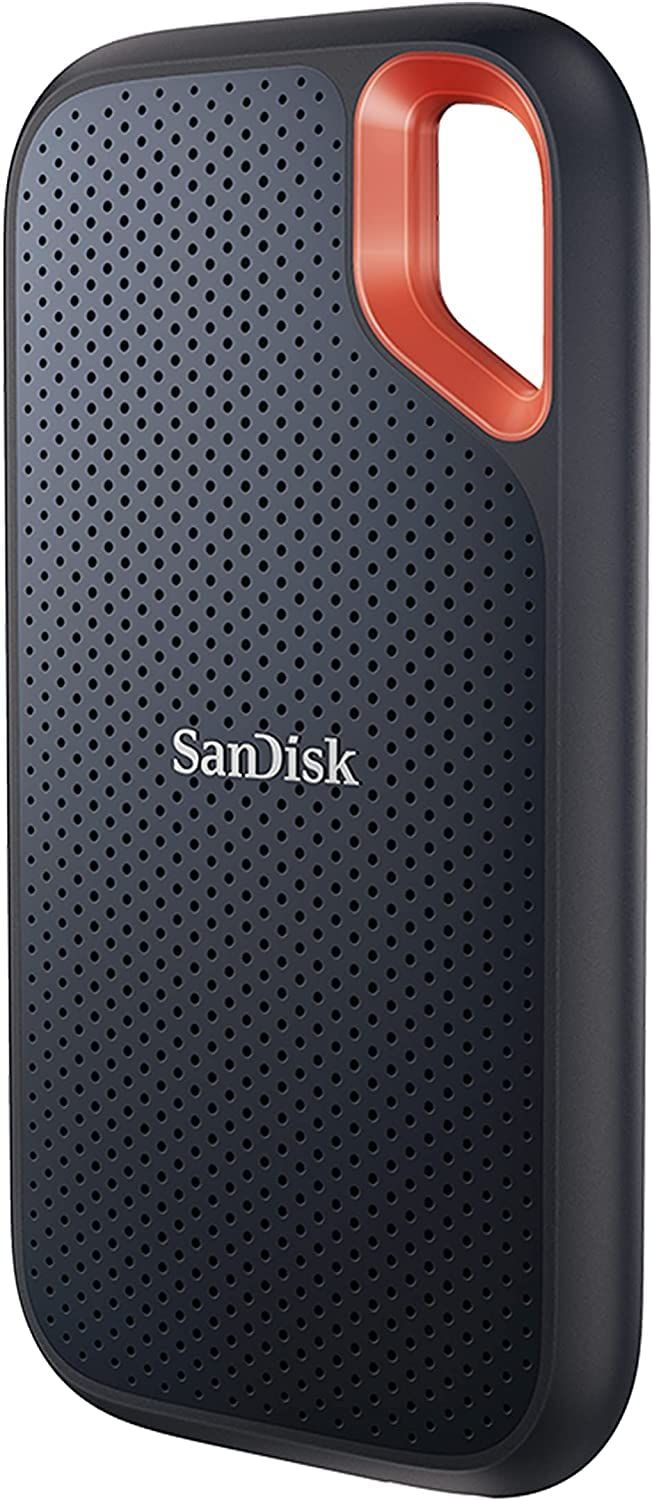
Rugged Portable SSD
Built to survive drops, rain, and dust, with IP65 or similar ratings and up to 3‑meter drop protection.
- Fast NVMe speeds up to 1,050MB/s
- Hardware encryption secures sensitive data
- Carabiner loop for easy attachment to bags
- Plastic build feels less premium than aluminum
- No significant speed gain over non‑rugged NVMe drives
Best for: Photographers, videographers, and outdoor workers.
Example: SanDisk 1TB Extreme Portable SSD
Standard Portable SSD
Sleek, aluminum‑bodied drives focused on speed and portability without extreme environmental protection.
- Aluminum unibody dissipates heat for sustained speeds
- Compact and pocket‑sized, as small as a credit card
- Broad compatibility with PCs, Macs, and gaming consoles
- No IP rating — not water‑ or dust‑resistant
- Drop protection limited to 6 feet
Best for: Students, office workers, and everyday users who carry a drive in a bag.
Example: Samsung T7 Portable SSD 1TB
High‑Speed Portable SSD
Leverage USB 3.2 Gen 2×2 for up to 2,000MB/s transfers, ideal for 4K video editing and large asset management.
- Blazing 2,000MB/s speeds cut file transfer times in half
- Forged aluminum chassis acts as a heatsink for sustained performance
- 5‑year warranty for long‑term peace of mind
- Requires a USB 3.2 Gen 2×2 port, still scarce on laptops
- Larger footprint and heavier than standard SSDs
Best for: Content creators, video editors, and professionals working with massive 4K/8K footage.
Example: SanDisk 4TB Extreme PRO Portable SSD
Portable Hard Drive (HDD)
Spinning‑disk drives offering massive capacity at rock‑bottom prices, but with much slower speeds and zero shock resistance.
- Extremely low cost per terabyte — for 500GB
- Plug‑and‑play USB 3.0 compatibility
- Slow transfer rates of ~100–120MB/s — 10× slower than SSD
- No drop protection — vulnerable to physical damage
- No hardware encryption or security features
Best for: Budget‑conscious buyers doing occasional backups or non‑critical file transfers.
Example: Maxone 500GB Ultra Slim Portable HDD
What Actually Matters
| Factor | Importance | Best brand |
|---|---|---|
Sustained read/write speed ≥500 MB/s for regular use; 1,000 MB/s for video editing Speeds below 400 MB/s become bottlenecks for large file transfers; avoid HDDs for frequent data movement. | Must-have | SanDisk (up to 1,050MB/s) |
Durability rating (IP & drop protection) At least IP55 or 2‑meter drop protection for on‑the‑go use If you commute or work in unpredictable environments, a ruggedized drive saves data from spills and falls. | Must-have | SanDisk Extreme series (IP65, 3m drop) |
Hardware encryption Look for 256‑bit AES hardware encryption Without encryption, a lost drive means exposed personal or client files. Software encryption adds CPU overhead; hardware is seamless. | Must-have | Both SanDisk and Samsung include it across their lines |
Portability (weight & size) Under 0.2 lbs and smaller than a smartphone A truly pocketable SSD disappears in your pocket; heavier drives become a nuisance on the go. | Nice-to-have | Samsung T7 (0.13 lbs, credit‑card footprint) |
USB‑C connectivity USB‑C port on the drive; cable included If your laptop is USB‑C only, a USB‑A drive will require an adapter — plan for it. | Must-have | SanDisk and Samsung include both USB‑C to C and USB‑C to A cables |
Maximum burst speed vs sustained speed Peak read speeds quoted by manufacturers often only apply to short bursts; sustained write speeds can drop when the drive fills up or heats up. | Marketing BS | — |
Shock‑resistant without an IP rating Vague claims of shock resistance without a specific drop height or IP certification are fluff — look for concrete test results. | Marketing BS | — |
Multi‑device compatibility as a USP Most SSDs work on Mac, Windows, and consoles out of the box. Universal compatibility is standard, not a premium feature. | Marketing BS | — |
Budget Tiers & Top Picks
What to buy at each price point — and exactly where spending more stops paying off.
Budget (Under $50)
$35 – $50Maxone 500GB Ultra Slim Portable External Hard Drive

Stop paying more: At this price, you get spinning HDD storage, not an SSD. For reliable speed, step up to our mid‑range picks.
When to upgrade: Need faster transfers or drop protection? Move to the mid‑range for SSDs starting around $150.
Mid‑Range ($150–$200)
$150 – $200SanDisk 1TB Extreme Portable SSD

Stop paying more: This is the sweet spot. Spending more than $200 gets you more capacity or speed, but for 1TB the SanDisk Extreme delivers everything most people need.
When to upgrade: If you work with huge 4K/8K video files or need 2TB+, consider the Samsung T7 2TB or the SanDisk Extreme PRO 4TB in our premium tier.
Premium (High Capacity & Speed)
$300 – $600SanDisk 4TB Extreme PRO Portable SSD

Stop paying more: Diminishing returns hit hard above $500; beyond this, you’re paying for incremental speed gains or niche ruggedness. If you need more than 4TB, you might be better off with a multi‑drive enclosure.
When to upgrade: Already maxed out? Next step is a desktop RAID array or Thunderbolt‑enabled DAS for desktop workflows.
Common Mistakes to Avoid
Buying an HDD when you need speed
Many budget shoppers grab a cheap portable hard drive, only to discover that 120MB/s isn’t enough for moving 100GB of video footage. A SanDisk Extreme SSD transfers the same data 8–10 times faster.
Cost of getting it wrong: Missed deadlines, frustration, and the cost of buying an SSD later — wasted and double the shopping time.
Not matching the interface: buying a USB 3.2 Gen 2×2 drive for a laptop that only has USB 3.2 Gen 1
The SanDisk Extreme PRO needs a 20Gbps port to hit 2,000MB/s. If your computer maxes out at 10Gbps, you’re paying for speed you can’t use.
Cost of getting it wrong: Overspending by $200–$300 on a drive that performs at half speed; the Samsung T7 would have been a better, cheaper match.
Skipping encryption for a drive that holds client data or tax returns
It’s easy to grab any fast SSD, but if the drive gets lost or stolen, unencrypted data is exposed. Password protection with 256‑bit AES is standard on SanDisk and Samsung drives.
Cost of getting it wrong: Potential data breach, legal liability, and the cost of identity theft recovery — a price difference for an encrypted model is cheap insurance.
Overbuying capacity: a 4TB portable SSD as a primary backup when cloud or a desktop drive would be cheaper
Unless you’re editing 8K raw footage on location, a 1TB or 2TB drive plus cloud sync is often more cost‑effective than a drive.
Cost of getting it wrong: Spending more than necessary; the extra capacity might go unused for years.
Trusting drop claims without an IP rating
Some drives say ‘shock‑resistant’ but lack a specific drop height or dust/water resistance. If you work outside, a drive like the SanDisk Extreme with IP65 and a 3‑meter drop rating is the real deal.
Cost of getting it wrong: Drive failure in the field, losing irreplaceable footage — price difference between a standard and ruggedized SSD is.
Find Your Match
What will you use the drive for?
Frequently Asked Questions
Do I really need a portable SSD, or can I just use cloud storage?
For quick local access, large file transfers, and offline work, a portable SSD is far faster and more reliable than cloud alone. You can edit 4K footage directly from a SanDisk Extreme without upload delays. Use the cloud as backup, not primary storage.
What’s the minimum speed I should accept in 2026?
At least 500 MB/s for everyday tasks. If you move large video files or want faster backups, aim for 1,000 MB/s (10Gbps) which the Samsung T7 and SanDisk Extreme deliver. For 2,000 MB/s, ensure your computer has a USB 3.2 Gen 2×2 port.
Why are external SSDs more expensive right now? (Source: r/DataHoarder)
Reddit communities note price hikes due to AI industry demand and component shortages. Manufacturers are allocating silicon to enterprise clients, reducing consumer supply. If you see a deal near the 90‑day average, it’s wise to buy soon before further increases.
How much should I spend on a portable SSD?
Expect to pay around $150–$190 for a robust 1TB SSD like the SanDisk Extreme. Budget gets you an HDD, but with much slower speeds. High‑capacity (2TB+) SSDs start and can climb to $565 for 4TB with top speed.
What’s the biggest mistake buyers make?
Buying a drive that’s too fast for their computer’s port. If your laptop only supports 10Gbps USB, a 2,000MB/s SSD will run at half speed. Check your device’s USB specification before overspending on a Gen 2×2 model.
Is it safe to buy a used external SSD?
Not recommended. SSDs have a finite number of write cycles, and you can’t know how heavily a used drive was used. You miss out on warranty and encryption. For sensitive data, a new drive with hardware encryption is worth the extra cost.
Which portable SSD do experts recommend for most users? (Source: Tom's Guide, TechRadar)
Tom’s Guide and TechRadar both recommend the SanDisk Extreme Pro and Samsung T9 as top picks for different needs. Our mid‑range pick, the SanDisk Extreme, balances speed and durability perfectly for most US buyers, aligning with expert consensus for 10Gbps reliability.
How we wrote this guide
We researched across 334,312 verified Amazon buyer reviews, 2 expert publications (Tom’s Guide and TechRadar), and community insights from r/DataHoarder. Specifications, pricing, and availability were confirmed in June 2026. We prioritized sustained speed, durability, and real‑world user satisfaction.
About this guide
Mubboo Editorial Team — independent US‑market consumer research. Picks based on analysis of over 334,000 verified buyer reviews, manufacturer specifications, and cross‑referenced expert sources including Tom’s Guide and TechRadar.