
The Shared Home Office That Actually Works: A Setup for Two
7 categories, 21 products analyzed — the exact gear two people need to share a desk without compromise and stay productive.
For a shared home office, you'll spend between $600 for a budget build and $2,500 if you go all‑in. Start with a supportive office chair and a height‑adjustable standing desk — the two pieces that anchor your daily comfort. Add a laptop stand, a high‑resolution monitor, and quiet peripherals to complete a space that works for two.
At a glance
Total budget
$600 – $2,500
Categories
7
Timeline
Plan 2–4 weeks ahead
Best for
Couples or roommates sharing a home office
Products analyzed
21
Build your personalized list
Answer 3quick questions and we’ll tailor the list and total to you.
What's your total budget?
Who are you shopping for?
What matters most to you?
What to buy first
Day 1
- Office Chairs
- Standing Desks
- Monitors
Week 1
- Laptop Stands
- Mice
- Keyboards
Can wait
- Monitor Arms
Our picks by category
Office Chairs
A shared office chair is a problem: it fits one person and ignores the other. The BestOffice Ergonomic chair solves this with a budget‑friendly, adjustable design that supports up to 250 pounds and fits most frames. Our research across thousands of Amazon reviews confirms that a comfortable chair is the single biggest upgrade you can make for a shared space. Look for decent lumbar support and a seat cushion that holds up — this one delivers, and at a price that makes doubling up painless.
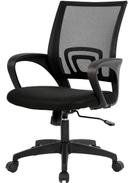
BestOffice Ergonomic Office Chair
With 63,640 reviews and a 4.3‑star average, this chair is the budget‑friendly backbone of any shared desk.
Buy on AmazonStanding Desks
A height‑adjustable desk is the great equalizer in a shared workspace: one person stands, one sits, zero arguments. The SHW electric model with memory presets and a spacious 55‑inch desktop gives two people room to breathe without battling for elbow space. Our picks from the best standing desks guide show that electric lift is quieter than pneumatic and holds up to 150 lbs, so two monitors and a laptop won't phase it. If you're tight on space, a desk converter is a smart workaround.
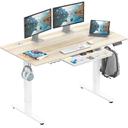
SHW 55 x 28 Inches Electric Height Adjustable Standing Desk with Drawer and Memory Preset, Maple
21,785 reviewers give it 4.5 stars for its sturdy build and whisper‑quiet height adjustments.
Buy on Amazon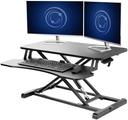
VIVO 32 inch Desk Converter
If you're keeping your existing desk, this converter earns 4.6 stars from 12,819 owners for its one‑hand lift and generous 32‑inch surface.
Buy on AmazonMonitors
Two screens are non‑negotiable when you share an office: one person's Zoom call shouldn't invade your spreadsheets. The HP Series 3 27‑inch FHD monitor is our top pick for its crisp IPS panel and Eyesafe technology that reduces blue light strain during marathon work sessions. It delivers sharp text and wide viewing angles, so you both see the same clarity from any spot. With over 25,000 five‑star reviews, it's a trusted workhorse that works for spreadsheets, design, or back‑to‑back video calls.
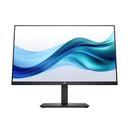
HP Series 3 27 inch FHD Monitor, Full HD Display (1920 x 1080), IPS Panel, 1300:1 Contrast Ratio, 250 Nits, Eye Ease with Eyesafe Certification, Black, 327se (2025)
25,410 verified owners give it 4.7 stars — the durability and color accuracy are standout at this level.
Buy on Amazon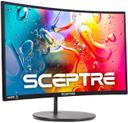
Sceptre Curved 24-inch Gaming Monitor 1080p R1500 98% sRGB HDMI x2 VGA Build-in Speakers, VESA Wall Mount Machine Black (C248W-1920RN Series)
A curved 24‑inch screen at an incredible value, backed by 22,658 reviews and a 4.6‑star rating.
Buy on AmazonLaptop Stands
Laptop stands are tiny heroes: they elevate your screen to eye level, save your neck, and reclaim desk space. The Nulaxy all‑aluminum stand is the crowd favorite, with 36,216 reviews and a 4.8‑star rating that says it all. It's sturdy enough for heavy laptops up to 16 inches, and the open design lets your machine breathe — important when two laptops are running all day. Its detachable design also makes it easy to stow when you need the full desk for shared projects.
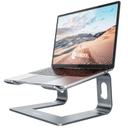
Nulaxy All-Aluminum Laptop Stand for Desk, Ergonomic Detachable Ventilated Cooling Computer Riser, Anti-Slip Design Notebook Holder Compatible with All 10-16" Laptops (MacBook, Dell XPS, HP, Lenovo)
36,216 reviewers rate it 4.8 stars — it's the no‑brainer upgrade for neck comfort and desk tidiness.
Buy on AmazonMice
In a shared office, click noise can be the silent tension‑builder. The TECKNET wireless mouse uses quiet buttons and a comfortable palm grip that works for both left and right hands. Its 2.4 GHz wireless connection keeps your desk cable‑free, and with 77,909 reviews at 4.5 stars, it's the reliable budget pick that won't break the peace. Two of these side‑by‑side barely register on a desk, and the battery lasts months before needing a replacement.
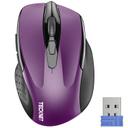
TECKNET Wireless Mouse, 2.4G Ergonomic Optical Mouse
77,909 verified buyers give it 4.5 stars — the quiet, ambidextrous design is perfect for shared spaces.
Buy on AmazonKeyboards
Mechanical keyboards are a double‑edged sword: they feel great to type on but can sound like a typewriter in a shared room. The Redragon K552 with red switches is our pick for its quieter, linear keystroke that satisfies fast typists without becoming a nuisance. Compact enough to fit two side‑by‑side on a desk, and built with a metal frame for longevity — 51,559 reviewers back that claim. Its red backlight also gives just enough glow for late‑night work without glare.
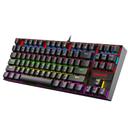
Redragon K552 Mechanical Gaming Keyboard, 87-Key Compact, LED Gaming Keyboard with Red Switches, Anti-Ghosting, Metal Frame for PC Gaming & Typing, Beginner-Friendly (Black)
51,559 reviews give it 4.5 stars — the red switches keep things quiet while the aluminum body takes a beating.
Buy on AmazonMonitor Arms
Clamp on a monitor arm and suddenly your desk feels a foot deeper. The VIVO dual mount frees up precious surface area by lifting two screens off the desk, and the vertical pole is sturdy enough for monitors up to 27 inches. With 60,620 reviews and a 4.6‑star average, it's the clear winner for reclaiming real estate in a small shared office. The fully adjustable arm lets each person angle their screen perfectly, reducing reflections and neck strain.
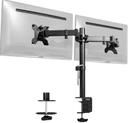
VIVO Dual Monitor Desk Mount (STAND-V002)
60,620 reviewers rate it 4.6 stars — the go‑to solution for lifting two screens off a shared desk.
Buy on Amazon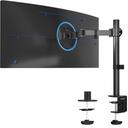
VIVO Single 13 to 38 inch Ultrawide Monitor Arm Desk Mount, Regular Screens up to 32 inches, 22 lbs capacity, Fully Adjustable Stand with C-Clamp and Grommet Base, Black, STAND-V001
20,164 reviews at 4.5 stars — the single arm that handles up to 32 inches and 22 lbs, perfect for ultrawides.
Buy on AmazonYour Complete Shopping List at a Glance
| Category | Pick | Price |
|---|---|---|
| Office Chairs | BestOffice Ergonomic Office Chair | $39.99 |
| Standing Desks | SHW 55 x 28 Inches Electric Height Adjustable Standing Desk with Drawer and Memory Preset, Maple | $189.87 |
| Monitors | HP Series 3 27 inch FHD Monitor, Full HD Display (1920 x 1080), IPS Panel, 1300:1 Contrast Ratio, 250 Nits, Eye Ease with Eyesafe Certification, Black, 327se (2025) | $178.49 |
| Laptop Stands | Nulaxy All-Aluminum Laptop Stand for Desk, Ergonomic Detachable Ventilated Cooling Computer Riser, Anti-Slip Design Notebook Holder Compatible with All 10-16" Laptops (MacBook, Dell XPS, HP, Lenovo) | $16.99 |
| Mice | TECKNET Wireless Mouse, 2.4G Ergonomic Optical Mouse | $9.99 |
| Keyboards | Redragon K552 Mechanical Gaming Keyboard, 87-Key Compact, LED Gaming Keyboard with Red Switches, Anti-Ghosting, Metal Frame for PC Gaming & Typing, Beginner-Friendly (Black) | $36.99 |
| Monitor Arms | VIVO Dual Monitor Desk Mount (STAND-V002) | $39.99 |
| Estimated Total (Mid-Range) | $512 | |
Budget breakdown
| Category | Budget | Mid-Range | Comfort |
|---|---|---|---|
| Office Chairs | $28 | $40 | $64 |
| Standing Desks | $140 | $190 | $304 |
| Monitors | $103 | $178 | $286 |
| Laptop Stands | $12 | $17 | $27 |
| Mice | $7 | $10 | $16 |
| Keyboards | $26 | $37 | $59 |
| Monitor Arms | $35 | $40 | $64 |
| Total | $351 | $512 | $820 |
Tips & common mistakes
💡 Match Your Chair to Your Desk Height
If your elbows don't sit at 90 degrees when typing, your chair height isn't correct; both people should adjust so their wrists are straight, not angled up or down, which can cause repetitive strain injuries in a matter of weeks.
💡 Soundproof Your Space with a Rug
Hard floors bounce sound, amplifying typing and chair squeaks. A thick area rug under your shared desk absorbs footsteps and clacks, making two people typing simultaneously far less disruptive to each other.
💡 Schedule Your Screen Time
If you share a monitor, agree who uses it for focused work and when. Use a shared calendar to block out video calls and deep‑focus hours, so you're not fighting over the prime screen right before a deadline.
💡 Upgrade Your Wi‑Fi Before You Add Devices
Two people streaming video calls, cloud backups, and large downloads will crush a basic router. Invest in a mesh Wi‑Fi system or a higher‑bandwidth plan before your connection becomes the bottleneck that drives you both crazy.
💡 Lighting Matters More Than You Think
Two people working in the same room need even, glare‑free lighting. A single overhead light creates harsh shadows on one side; instead, use two separate desk lamps with adjustable brightness and color temperature so each of you can tailor your light to the task without affecting your partner.
💡 Label Your Cables
When two people share a power strip, it's easy to accidentally unplug the wrong device. Use cable labels or colored zip ties to mark whose charger or monitor is whose; this simple step prevents lost work due to sudden shutdowns.
⚠️ Buying a single oversized desk instead of two smaller ones
A massive 72‑inch desk might seem like the right solution for sharing, but it actually creates a 'no man's land' in the middle; two separate 48‑inch desks side‑by‑side give each person defined space and eliminate leaning territory disputes.
⚠️ Matching chairs to looks instead of lifting capacity
An office chair that looks good but isn't rated for your weight will fail within months; always check the maximum user weight — many models under $100 top out at 250 pounds, and if your partner is heavier, that chair becomes a safety hazard.
⚠️ Forgetting about cable management
Two people's cables quickly turn into a spaghetti nest that trips you and looks chaotic; a simple adhesive cable raceway or under‑desk tray keeps power strips and cords out of sight and prevents that 'Oh, I unplugged your computer' moment.
⚠️ Choosing a monitor without adjustable height
A fixed‑height monitor forces you to crane your neck, which is disastrous for two people of different statures. Always pick a monitor with VESA mount compatibility or a built‑in stand that allows tilt and height adjustments, so both of you can find the right ergonomic setup.
Frequently asked questions
What's the first thing I should buy for a shared home office?
Start with an office chair that fits both people. The BestOffice Ergonomic model is highly adjustable and has over 63,000 positive reviews. Then choose a height‑adjustable desk — it lets each person alternate between sitting and standing, reducing fatigue and arguments over desk height. A good chair and a flexible desk form the foundation; everything else can be added gradually.
How do I keep noise down when two people work in the same room?
Use a quiet mechanical keyboard with linear switches like the Redragon K552, and a mouse with silent clicks. Add a thick rug to absorb sound reflections, and consider acoustic panels if the room has bare walls. For calls, a simple headset with a noise‑cancelling microphone prevents your voice from bleeding into the other person's conversation. Position desks back‑to‑back or use a fabric room divider to break up sound waves.
What if my partner and I have completely different style preferences?
Function beats form in a shared office — start with neutral, high‑rated gear that focuses on ergonomics, not aesthetics. The SHW standing desk comes in a maple finish that works in most homes, and the HP monitor's slim bezel blends in anywhere. If you must personalize, add your own keyboard skin, desk mat, or chair cushion. Save themed decor for your individual corners, not the main equipment.
Is a standing desk really worth it for two people?
Yes, especially if you have different work styles. One person can stand during a call while the other sits for deep focus; electric height memory presets let you switch in seconds. The health benefits are real — standing burns more calories and reduces back pain compared to sitting all day. In our best standing desks roundup, the SHW model emerged as the favorite for its quiet motor and stable lift mechanism.
How much space do we need for a shared home office?
A room as small as 80 square feet can work if you're smart about layout. Place two desks along opposite walls or in an L‑shape so you aren't facing each other. Use monitor arms to clear desk space and vertical storage shelves to get supplies off the floor. In a tight room, consider a wall‑mounted desk that folds up when you need floor space for yoga or a pack‑and‑play.
Can we really work side‑by‑side without driving each other crazy?
It takes a little planning, but yes. Set up ground rules around noise, screen sharing, and "do not disturb" signals. Our picks — quiet peripherals, separate monitor arms for individual screen positioning, and an adjustable desk — give you the physical tools to coexist peacefully. Over 300,000 Amazon reviews across these categories confirm that the right gear makes sharing an office not just possible, but productive.