
Smart Home for Seniors: Safety, Comfort, and Peace of Mind
Setup tips and product picks to keep older adults safe, connected, and independent at home.
A basic smart home safety setup starts with a smart lock, a security camera, and a voice assistant—all for under $200. Prioritize entryway security and fall prevention; you can add smart lights and plugs later. These three categories together cover door access, visual monitoring, and hands-free help, providing immediate peace of mind without overwhelming tech.
At a glance
Total budget
$300 – $2,000
Categories
7
Timeline
Plan 2–4 weeks ahead
Best for
Seniors or caregivers for older adults
Products analyzed
21
Build your personalized list
Answer 3quick questions and we’ll tailor the list and total to you.
What's your total budget?
Who are you shopping for?
What matters most to you?
What to buy first
Day 1
- Smart Locks
- Security Cameras
- Smart Speakers
Week 1
- Smart Thermostats
- Smart Lights
- Smart Plugs
Can wait
- Smart Doorbells
Our picks by category
Smart Locks
Forgetting to lock the door is a common worry that smart locks eliminate. A good keypad lock lets you manage entry for caregivers without hiding keys under the mat. Look for auto-lock and a backlit keypad to simplify nighttime arrivals. Senior-friendly models feature large, backlit buttons and voice control integration so you can lock the door with a simple Alexa command. Keyless entry also removes the struggle of handling small keys, which can be difficult for arthritic hands.
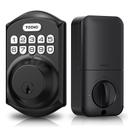
TEEHO TE001 Keyless Entry Door Lock with Keypad - Smart Deadbolt Lock for Front Door with 2 Keys - Auto Lock - Easy Installation - Matte Black
One of the top-rated keypad locks, with over 23,000 reviews and a simple auto-lock for peace of mind.
Buy on AmazonSecurity Cameras
A quick phone check replaces anxious trips to the door. Motion alerts and two-way talk let you screen visitors from the couch. Choose a camera with clear night vision and a wide view for full coverage. For seniors living alone, a camera pointed at the front door or a common area can reassure family members who are miles away. Many models offer adjustable motion zones so you avoid false alerts from passing cars, and built-in sirens can deter unwanted guests.
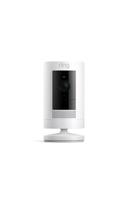
Ring Outdoor Cam (Stick Up Cam) Battery
A well-known pick with over 62,000 reviews, easy app control, and reliable outdoor monitoring.
Buy on Amazon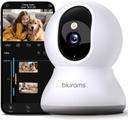
Security Camera 2K, blurams Baby Monitor Dog Camera 360-degree for Home Security w/Smart Motion Tracking, Phone App, IR Night Vision, Siren, Works with Alexa & Google Assistant & IFTTT, 2-Way Audio
A budget-friendly 2K camera with motion tracking and two-way audio, backed by 31,000+ reviews.
Buy on AmazonSmart Speakers
Voice control turns “I need help” into a hands-free call for assistance. Smart speakers also set medication reminders and manage devices without phones or remotes. Pick one with clear sound and a straightforward setup that meshes with your other gear. The ability to make hands-free calls to family members is a literal lifesaver in an emergency when a phone is out of reach. Look for a speaker with a physical mute button for privacy, and consider placing extra units in high-fall-risk areas like bathrooms and staircases.
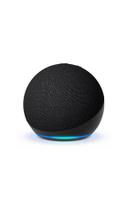
Amazon Echo Dot (newest model) - Vibrant sounding speaker, Designed for Alexa+, Great for bedrooms, dining rooms and offices, Charcoal
The most popular smart speaker, with a huge 4.7-star rating across 193,000+ reviews—simple and effective.
Buy on AmazonSmart Thermostats
A smart thermostat adjusts to your routine, trimming energy bills without effort. It’s especially helpful for arthritic hands that struggle with small dials. Look for models with large, readable displays and simple app controls. Large, backlit displays with big numbers make it easy to check the temperature from across the room. Some models also send alerts if the temperature drops dangerously low, which is critical for seniors during winter months.
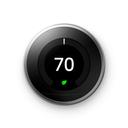
Nest T3016US (Stainless Steel)
The Nest Learning Thermostat adapts to your schedule, with over 32,000 reviews and proven energy savings.
Buy on Amazon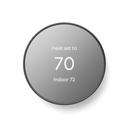
Google Nest Thermostat - Smart Thermostat for Home - Programmable Wifi Thermostat - Charcoal
A streamlined Nest for easy scheduling, with nearly 29,000 reviews and a straightforward interface.
Buy on AmazonSmart Lights
Stumbling to a wall switch at night is a fall risk smart bulbs erase. Voice or schedule control lights hallways and bathrooms automatically. Color-changing bulbs can simulate sunrise for a gentle wake-up. Motion-triggered lights in hallways and bathrooms can guide a senior safely to the bathroom without any interaction. You can also set 'bedtime' scenes that dim all lights except a nightlight by the bed, and gradually brighten in the morning to mimic natural light.
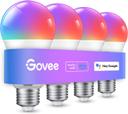
Govee Smart Light Bulbs, Color Changing Light Bulb, Work with Alexa and Google Assistant, 16 Million Colors RGBWW, WiFi & Bluetooth LED Light Bulbs, Music Sync, A19, 800 Lumens, 4 Pack
A 4-pack of color bulbs with 26,000+ reviews, works with Alexa and Google—great for setting schedules.
Buy on Amazon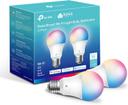
Kasa Smart Light Bulbs, Full Color Changing Dimmable Smart WiFi Bulbs Compatible with Alexa and Google Home, A19, 60 W 800 Lumens,2.4Ghz only, No Hub Required, 2-Pack (KL125P2), Multicolor
A compact 2-pack with full color and no hub needed, backed by 25,000+ reviews and a 4.5 rating.
Buy on AmazonSmart Plugs
Forget to turn off the coffee maker? A smart plug can cut power remotely. They help reduce fire risks and save energy by shutting off forgotten appliances. Look for plugs with energy monitoring to spot power-hungry devices. Schedule a plug to turn off space heaters at night, or automatically cut power to a curling iron after 30 minutes. For seniors with memory concerns, these automated routines eliminate the anxiety of 'Did I leave it on?'
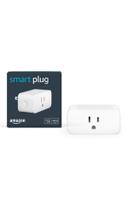
Amazon Smart Plug, Works with Alexa, Simple Setup, Endless Possibilities
The simplest Alexa-compatible plug, with an incredible 570,000+ reviews and a simple setup process.
Buy on AmazonSmart Doorbells
Seeing who’s at the door without opening it is a huge safety upgrade. Video doorbells let you talk to visitors from the couch, and motion alerts catch package thieves. Choose one with a wide-angle lens and night vision for clear footage. A doorbell with head-to-toe video ensures you can see packages on the ground and identify all visitors, even those who avoid eye-level cameras. Two-way talk lets a senior tell a delivery person where to leave a heavy box without opening the door.
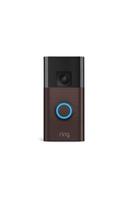
Ring Battery Doorbell, Home or business security with Head-to-Toe video, Live View with Two-Way Talk, and Motion Detection & Alerts, Venetian Bronze
A versatile battery doorbell with head-to-toe video and 50,000+ reviews, easy to install and monitor.
Buy on AmazonYour Complete Shopping List at a Glance
| Category | Pick | Price |
|---|---|---|
| Smart Locks | TEEHO TE001 Keyless Entry Door Lock with Keypad - Smart Deadbolt Lock for Front Door with 2 Keys - Auto Lock - Easy Installation - Matte Black | $35.99 |
| Security Cameras | Ring Outdoor Cam (Stick Up Cam) Battery | $39.99 |
| Smart Speakers | Amazon Echo Dot (newest model) - Vibrant sounding speaker, Designed for Alexa+, Great for bedrooms, dining rooms and offices, Charcoal | $49.99 |
| Smart Thermostats | Nest T3016US (Stainless Steel) | $157.99 |
| Smart Lights | Govee Smart Light Bulbs, Color Changing Light Bulb, Work with Alexa and Google Assistant, 16 Million Colors RGBWW, WiFi & Bluetooth LED Light Bulbs, Music Sync, A19, 800 Lumens, 4 Pack | $31.34 |
| Smart Plugs | Amazon Smart Plug, Works with Alexa, Simple Setup, Endless Possibilities | $24.99 |
| Smart Doorbells | Ring Battery Doorbell, Home or business security with Head-to-Toe video, Live View with Two-Way Talk, and Motion Detection & Alerts, Venetian Bronze | $59.99 |
| Estimated Total (Mid-Range) | $400 | |
Budget breakdown
| Category | Budget | Mid-Range | Comfort |
|---|---|---|---|
| Smart Locks | $25 | $36 | $58 |
| Security Cameras | $30 | $40 | $64 |
| Smart Speakers | $35 | $50 | $80 |
| Smart Thermostats | $100 | $158 | $253 |
| Smart Lights | $16 | $31 | $50 |
| Smart Plugs | $17 | $25 | $40 |
| Smart Doorbells | $42 | $60 | $96 |
| Total | $265 | $400 | $641 |
Tips & common mistakes
💡 Start with security
Set up a smart lock and a doorbell camera first. These give immediate peace of mind by controlling and monitoring entry points. A lock with auto-lock ensures the door is never left unlocked by accident, and a doorbell camera lets you see and speak to anyone at the door from anywhere in the house.
💡 Use voice control wisely
Place an Echo Dot in the bedroom and living room. Voice commands can call family, set reminders, and control lights without getting up. For seniors with limited mobility, being able to call for help or adjust the thermostat without walking across the room is a game-changer.
💡 Automate lighting for fall prevention
Use motion sensors or schedules to light paths at night. Smart bulbs in hallways and bathrooms reduce nighttime falls dramatically. Set them to a soft red tone at night to preserve night vision while still providing safe passage.
💡 Check compatibility
Ensure all devices work with the same voice assistant (Alexa, Google, or Siri). A unified system is far easier for seniors to manage. Avoid mixing ecosystems; using only Alexa-compatible devices, for example, lets you control everything from one app and one set of voice commands.
💡 Plan for power outages
Choose locks with a physical key backup and cameras with battery power. If the Wi-Fi drops, these essentials still function. A lock with a keyhole doesn't become a brick during a power outage, and a camera with local recording continues to capture footage even without internet.
⚠️ Skipping physical key backup
Even smart locks need a key when batteries die. A lock with no keyhole can leave you locked out during a power failure. Always check that the model includes a physical key override, because batteries can fail without warning.
⚠️ Overcomplicating with too many apps
Using devices from different brands often requires switching between apps. Stick to one or two ecosystems like Alexa or Google Home. Juggling three different apps to turn on a light is frustrating for anyone, but especially for seniors who are less comfortable with technology.
⚠️ Ignoring Wi‑Fi range
Smart devices far from the router can drop offline. A camera that constantly disconnects is useless—use a mesh system if needed. For a reliable smart home, test Wi-Fi signal strength in every room where you plan to put a device; even a weak signal can cause frustrating delays.
Frequently asked questions
What is a smart home for seniors?
It’s a collection of easy-to-use devices that automate safety and comfort. Smart locks, cameras, speakers, and lights can be controlled by voice or phone, reducing the need to move around the house. The goal is to keep older adults independent and connected while giving caregivers peace of mind. The technology is designed to be straightforward, with large buttons and voice prompts, so even those with limited tech experience can use it confidently.
Do I need a central hub?
Not necessarily. Many smart devices connect directly to your home Wi‑Fi and work with free apps. A voice assistant like Amazon Echo Dot can act as a hub for controlling multiple devices with your voice. Stick to one ecosystem (Alexa or Google) to keep things simple. An Echo Dot can also serve as an intercom between rooms, helping family members communicate without shouting.
Is it hard to set up?
Most modern smart devices are designed for DIY installation. A keypad lock replaces your existing deadbolt in about 15 minutes with a screwdriver. Cameras and speakers plug in and connect via an app. If you can use a smartphone, you can set these up. Many manufacturers provide step-by-step video guides and 24/7 phone support to walk you through any tricky parts.
What happens if the internet goes out?
Smart locks that have a physical key backup will still work manually. Battery-powered cameras can record locally if they have an SD card. However, voice assistants and remote access will be offline. It’s smart to choose devices that don’t fully depend on the cloud. It's also wise to keep a printed list of emergency contacts and your Wi‑Fi password near the devices in case you need to reset them.
Can I control everything by voice?
Yes, if you pick devices that work with Alexa or Google Assistant. You can lock doors, turn on lights, or check a camera feed just by speaking. This is especially helpful for seniors with limited mobility or vision. Make sure to group devices by room for easier commands. For example, you can say 'Alexa, goodnight' to lock the door, turn off lights, and set the thermostat to a sleep temperature all at once.
Are smart devices safe from hacking?
When set up correctly, yes. Use a strong, unique Wi‑Fi password and enable two-factor authentication on your accounts. Keep device firmware updated, and avoid using default passwords. Major brands like Ring and Nest have regular security updates and monitoring. Always change the default username and password on your router as well, and consider setting up a guest network for your smart devices to isolate them from your main computers.