Prices verified Jul 7 · Always confirm at the retailer before buying.
Quick answer
SwitchBot's ecosystem splits into two groups, confirmed on the brand's own Matter page: Bluetooth-only devices (Bot, Curtain, Lock, Meter, most sensors, Plug Mini) that need a separately-purchased Hub (Hub Mini $36.10, Hub 3 $99.99) to reach Matter, Apple HomeKit, Amazon Alexa, or Google Home — and newer Wi-Fi-native robot vacuums (K11+ $239.99, S20 $429.99, K10+ Pro Combo $299.99) that get full smart-home functionality without any Hub at all. Hub Mini is the practical starting point for most households and runs cheaper on Amazon than buying direct. For locks, the classic SwitchBot Lock ($99.99, direct only) pairs with Keypad Touch ($49.99 on Amazon) for fingerprint entry, or the newer Lock Ultra + Keypad Touch bundle ($209.99 on Amazon) covers both in one purchase. SwitchBot's official store runs rotating flash-sale discount codes on individual product pages — check the current offer at checkout rather than relying on a fixed code, since they change often. Buying direct also carries SwitchBot's 1-year warranty; Amazon purchases go through Amazon's own return process instead.
Most of SwitchBot's catalog runs on Bluetooth alone until you add a Hub — the robot vacuums are the exception. Every product below links to the current price on Amazon and/or SwitchBot's official store, so you can compare before buying, see which bundles exist, and confirm Matter/HomeKit/Alexa/Google Home compatibility before you check out. SwitchBot's official store also runs rotating flash-sale codes on individual product pages — check today's official-store offer at checkout rather than assuming a fixed discount.
Start with Hub Mini if you're building more than one device. Only want a robot vacuum? K11+ and S20 skip the Hub requirement entirely. Building out lock access? Lock Ultra + Keypad Touch bundles fingerprint and PIN entry in one purchase.
Which SwitchBot devices are worth buying in 2026?
- Best overall (the ecosystem backbone):Hub Mini—$36→
- Best retrofit (any button):Bot—$26→
- Best lock companion:Keypad Touch—$50→
- Best sensor value:Meter Plus—$15→
- Best upgrade hub:Hub 3—$100→
- Best lock bundle:Lock Ultra + Keypad—$210→
- Best compact vacuum:K11+ Vacuum—$240→
- Best premium vacuum:S20 Vacuum—$430→
- Best ecosystem bundle:K10+ Pro Combo—$300→
- Best budget lock:SwitchBot Lock—$100→
- Best curtain robot:Curtain (Rod 2)—$99→
- Best for automations:Motion Sensor—$25→
- Best entry point:Plug Mini—$15→
Verdicts here are synthesized from SwitchBot's own Matter support and warranty pages, independent YouTube reviews (Paul Hibbert, Smart Home Junkie, Tech With Brett), real Reddit discussion in r/HomeKit and r/TrySwitchBot, and real GitHub issue reports from Home Assistant and Homebridge integration developers. We describe compatibility requirements, real owner-reported quirks, and value.

How did we pick these?
What this guide covers
SwitchBot's catalog now spans Bluetooth accessories, three generations of Hub, several lock tiers, and a growing robot-vacuum line. We picked 13 devices that cover hubs, curtain robots, locks, sensors, meters, plugs, robot vacuums, and ecosystem bundles — enough to answer "where do I start" without listing every SKU variant. Selections were synthesized from SwitchBot's own Matter and product pages, independent YouTube reviews, real Reddit discussion, and real GitHub integration-issue reports.
The Hub requirement decided the whole structure
The single biggest thing we found: most of this catalog is Bluetooth-only until you add a Hub, confirmed directly on SwitchBot's own Matter page and independently by two YouTube reviewers on camera. We built the ranking around that split rather than burying it — devices that need a Hub say so explicitly, and the robot vacuums that don't need one are flagged as the exception.
Where we found real, specific complaints, we kept them
A firmware-version mismatch that locked out a Keypad Touch, a Hub 2 that stalled mid-update, an app that can't confirm whether a Bot's physical arm actually moved — these are real, dated reports from Reddit and GitHub, not invented. None of them point to a systemic reliability problem; they're specific, product-level issues worth knowing about before you buy that exact device.
Amazon vs buying direct
For every device sold on both Amazon and SwitchBot's official store, we checked the current price on each and ordered Amazon first when it was the same price or cheaper — which was true for every mixed-retailer device in this guide. Buying direct still carries SwitchBot's 1-year warranty; Amazon purchases go through Amazon's own return process instead.
SwitchBot Hub Mini
Prices checked Jul 7, 2026 · Affiliate
Pros:
- Unlocks voice assistants and remote access for the rest of the lineup
- Doubles as an infrared blaster for legacy TVs and AC units
- Confirmed on SwitchBot's own Matter page as one of three Hub SKUs (Mini, Hub 2, Hub 3) that bridge the Bluetooth-only device line to Matter/HomeKit/Alexa/Google Home
Cons (honest weight):
- Most of the lineup's headline features (remote access, voice control, automations) only unlock once you add this — budget for it early
- A separate Apple Home hub (HomePod/Apple TV) or equivalent Google/Amazon hub is still required on top of this for full Matter routing, per SwitchBot's own FAQ
- One more device to power and place
Mubboo Verdict
The quiet backbone of the ecosystem: this is the device that decides whether the rest of your SwitchBot devices reach Matter, HomeKit, Alexa, or Google Home at all. Amazon runs a few dollars cheaper than buying direct for the identical hardware.
SwitchBot Bot

Prices checked Jul 7, 2026 · Affiliate
Pros:
- Physically presses or flips almost any button or rocker switch
- The community's favorite trick for making "dumb" appliances smart — coffee makers, PCs, garage buttons
- Tiny, adhesive-mounted, and the cheapest way onto this list
Cons (honest weight):
- One real owner report on r/HomeKit: the app can show the Bot as "working" and correctly paired as a Matter device while the physical arm doesn't reliably press the target switch — test your specific placement before relying on it
- Needs the Hub above for schedules and remote triggering — Bluetooth-only out of the box
- One Bot equals one button, so costs add up across a home
Mubboo Verdict
The original gadget that made the brand — still the cheapest way to retrofit a bare button, and about 10% cheaper on Amazon than buying direct for the same device.
SwitchBot Keypad Touch

Prices checked Jul 7, 2026 · Affiliate
Pros:
- Adds fingerprint and code entry to the SwitchBot Lock
- Hand out temporary codes for guests or cleaners
- Weather-resistant for outside-the-door mounting
Cons (honest weight):
- A real r/TrySwitchBot report: a firmware-version mismatch between the Keypad Touch and the Lock caused NFC-card errors and disabled keypad functions on first setup — update both devices' firmware before first use
- Only useful paired with a Lock (see below)
- Battery-powered, so it needs occasional changes
Mubboo Verdict
The piece that makes any SwitchBot Lock feel finished — fingerprint and guest codes mean the family never needs the app. Amazon runs a genuine $10 (17%) cheaper than buying direct for the same hardware.
SwitchBot Meter Plus

Prices checked Jul 7, 2026 · Affiliate
Pros:
- Tracks temperature and humidity with an easy-read e-ink display
- Logs history in the app for trend-watching
- Can trigger a humidifier or AC through the rest of the ecosystem, once bridged through the Hub
Cons (honest weight):
- Remote alerts need the Hub — Bluetooth-only out of the box
- Single-room coverage, so larger homes need several
- Not a substitute for a whole-home climate system
Mubboo Verdict
A pocket-money climate logger that quietly anchors humidity-based automations once it's bridged through the Hub — pricing is a virtual wash between Amazon and buying direct.
SwitchBot Hub 3

Prices checked Jul 7, 2026 · Affiliate
Pros:
- Bridges up to 30 SwitchBot devices to Matter/HomeKit/Alexa/Google Home at once — roughly 4x Hub 2's 8-device cap, per SwitchBot's own comparison table
- Doubles as a physical smart button, IR blaster, and temperature/humidity/motion sensor in one unit
- Confirmed by an independent 45,000-view YouTube review (Paul Hibbert) as a genuinely capable Matter bridge, not just a spec-sheet claim
Cons (honest weight):
- Costs roughly 3x Hub Mini for most households that don't need 30-device capacity
- The same reviewer found lock-state notifications can briefly show "locked" a few seconds after an actual unlock
- Matter still needs a home hub from Apple, Google, or Amazon on top of this (a HomePod, Apple TV, or equivalent) — SwitchBot's own FAQ confirms this
Mubboo Verdict
The higher-capacity upgrade path once Hub Mini's simpler bridging runs out of room — a real independent review confirms it works as advertised, with one minor lock-notification lag worth knowing about.
SwitchBot Lock Ultra + Keypad Touch

Prices checked Jul 7, 2026 · Affiliate
Pros:
- Bundles the Lock Ultra deadbolt retrofit with fingerprint + PIN keypad access in one purchase
- An independent reviewer who switched from an Aqara U200 said Lock Ultra hardware "works better" after the switch
- Works over Wi-Fi natively for app control, on top of the Bluetooth+Hub bridging the rest of the lock lineup needs for Matter
Cons (honest weight):
- Home Assistant users report very few sensors/triggers exposed on Lock Ultra (no doorbell-style trigger visible)
- SwitchBot's separately-sold remote accessory has been reported not to work reliably with Lock Ultra — don't count on it
- SwitchBot sells several Lock Ultra + Keypad tiers (Touch, Vision, Vision Pro) at different prices — confirm you're ordering the fingerprint+PIN Touch tier, not the pricier facial-recognition Vision tiers
Mubboo Verdict
The one-purchase way to get retrofit keyless entry with fingerprint and PIN access — a real independent review rates the Lock Ultra hardware above a comparable Aqara model, with the usual caveat to confirm which keypad tier you're ordering.
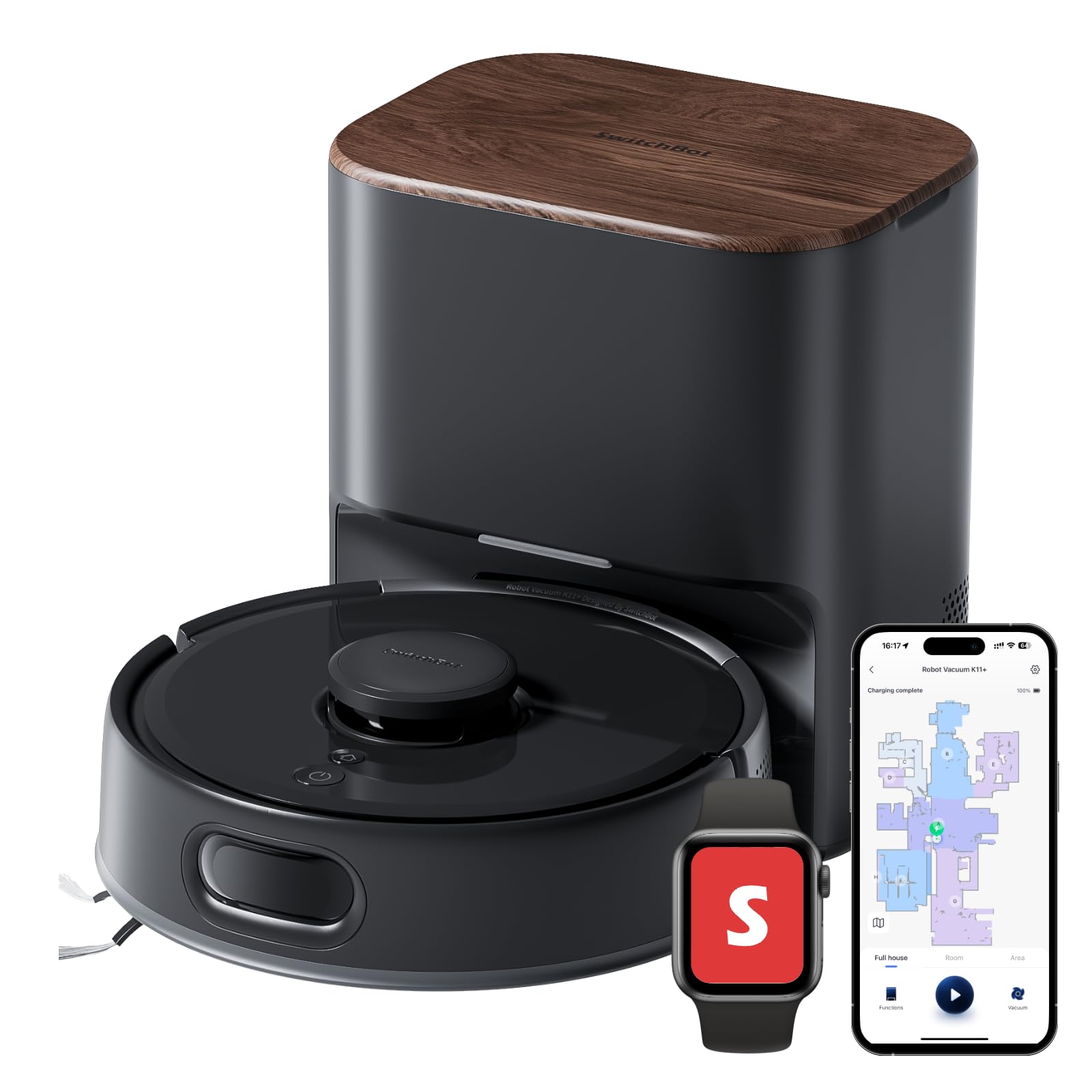
SwitchBot K11+ Robot Vacuum & Mop
Prices checked Jul 7, 2026 · Affiliate
Pros:
- Connects over Wi-Fi natively — unlike most of the SwitchBot lineup, it does NOT need a Hub for full Matter functionality (auto-clean, modes, return-to-base, room selection), per SwitchBot's own Matter page
- 6,000Pa suction with a 90-day hands-free self-empty base, per SwitchBot's spec sheet
- Compact footprint marketed as fitting under furniture other robot vacuums can't reach
Cons (honest weight):
- A 2026 GitHub issue shows HomeKit/Homebridge bridging support for SwitchBot's newest vacuums lagging behind release — check current Home Assistant/HomeKit support before assuming day-one compatibility
- The most detailed video review found for this model reads as heavily sponsored/promotional — treat marketing claims (LiDAR-style mapping, anti-tangle roller) as spec-sheet claims, not independently verified
- If bridged through a Hub over Bluetooth instead of Wi-Fi, it drops to basic start/stop only — connect it over Wi-Fi directly to get full functionality
Mubboo Verdict
The compact, Wi-Fi-native pick that skips the Hub requirement entirely for full functionality — just verify HomeKit/Home Assistant bridging status before buying, since it's the newest vacuum in the line.
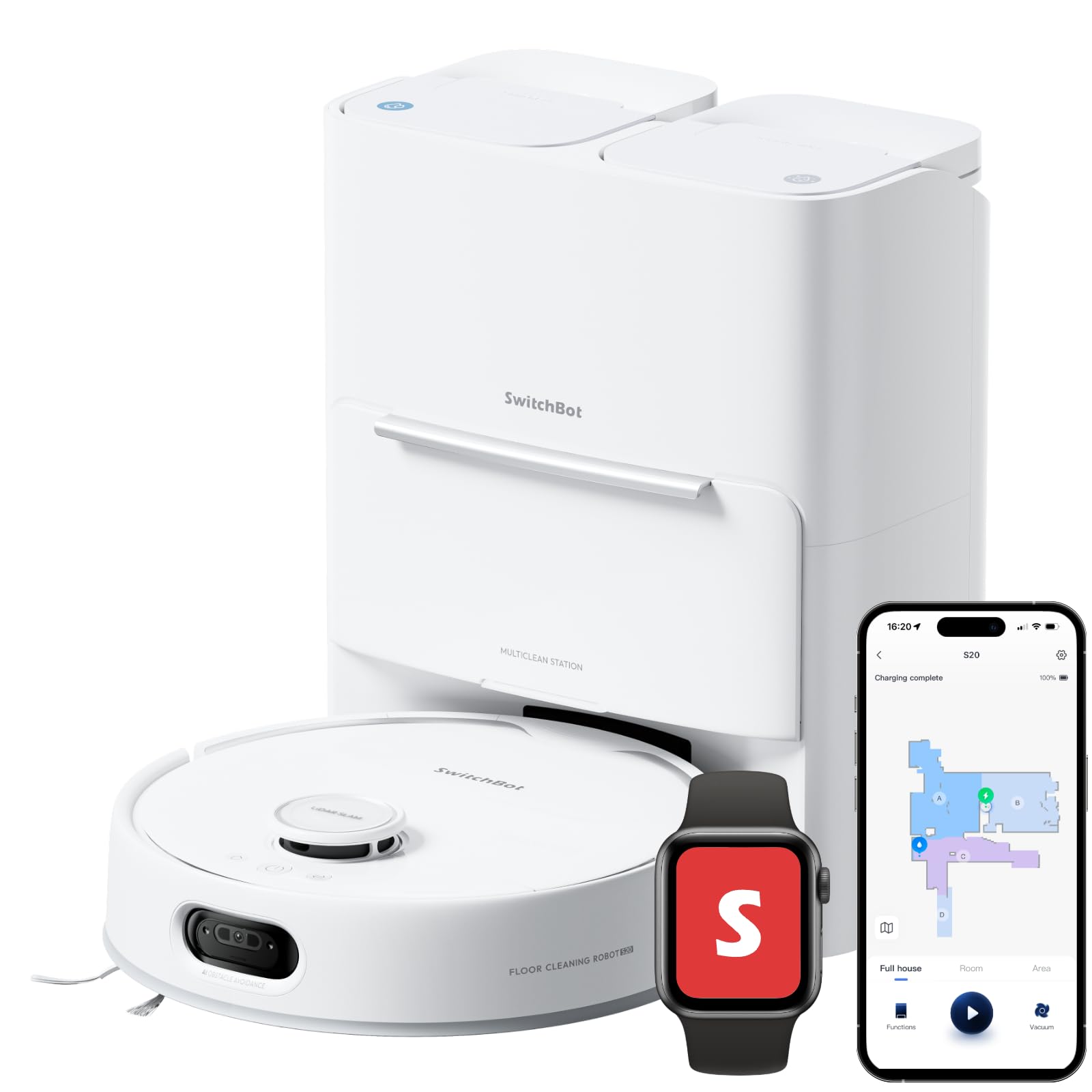
SwitchBot S20 Robot Vacuum and Mop
Prices checked Jul 7, 2026 · Affiliate
Pros:
- A reviewer who already owns three earlier SwitchBot vacuums (S10, K10, K10 Pro) rated the S20 an upgrade worth testing, with more suction than the S10 and real-world spill detection during testing
- 10,000Pa suction with a roller mop and AI-assisted navigation, per SwitchBot's spec sheet
- Connects over Wi-Fi natively — full Matter functionality without a Hub, same as K11+
Cons (honest weight):
- The most expensive SwitchBot device in this guide at $429.99
- The same reviewer's multi-generation experience suggests SwitchBot's robot-vacuum firmware is still maturing model to model
- HomeKit/Homebridge community support for the newest vacuum SKUs lags behind release, per an open GitHub feature request
Mubboo Verdict
The flagship vacuum a repeat SwitchBot owner rated their best one yet — real spill-detection and mopping performance from an independent test, at the top of this guide's price range.
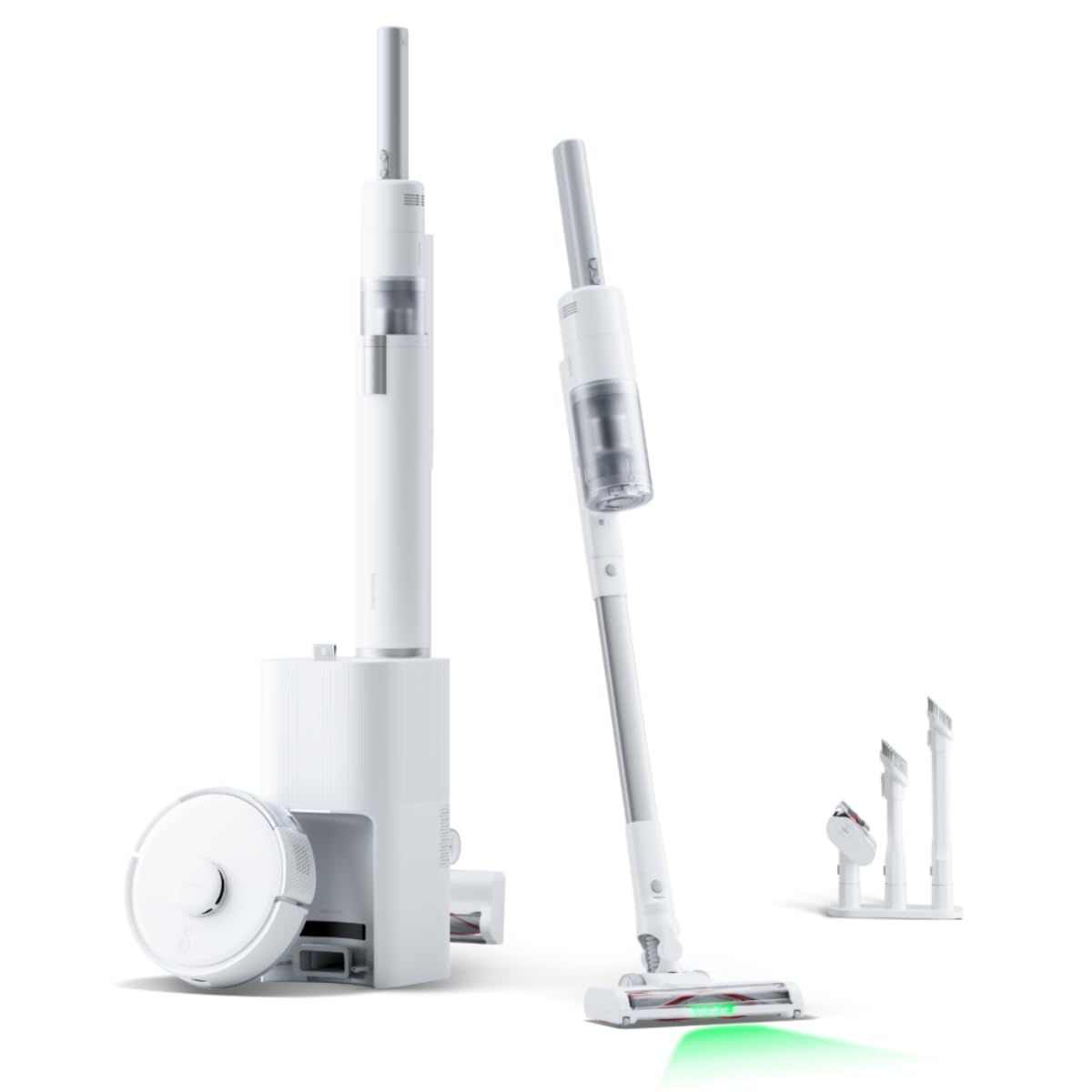
SwitchBot K10+ Pro Combo
Prices checked Jul 7, 2026 · Affiliate
Pros:
- Pairs the K10+ Pro robot vacuum with a docking station that doubles as a handheld cleaner for couches, stairs, and other surfaces the robot can't reach, per SwitchBot's own "dual machine connectivity" description
- Self-empties for up to 70 days between manual bin changes, per the product listing
- Wi-Fi native — full Matter functionality without needing a separate Hub
Cons (honest weight):
- Costs more upfront than buying just the robot vacuum alone
- The handheld attachment adds another battery and dock to keep charged
- SwitchBot's own site lists a much higher $799.99 reference price for this bundle — treat any price above the current Amazon listing as a marketing anchor, not the real cost
Mubboo Verdict
The genuine two-in-one pick for this lineup: a self-emptying floor robot plus a handheld tool for the surfaces it can't reach, at a real price well below SwitchBot's own reference figure.
SwitchBot Lock

Prices checked Jul 7, 2026 · Affiliate
Pros:
- Mounts over your existing deadbolt thumb-turn — keeps your keys working
- Installs in minutes with adhesive, no drilling or locksmith
- Pairs with the Keypad Touch or Hub for codes and remote unlock
Cons (honest weight):
- Needs the Hub for remote access away from home — Bluetooth-only out of the box
- Bulkier than a built-in smart deadbolt
- No current clean Amazon listing for this exact SKU — Lock Ultra above is the newer generation with wider retail availability
Mubboo Verdict
The most-recommended no-drill smart lock retrofit — keeps your existing key and installs in minutes, but plan on adding a Hub for true remote control. Buying direct includes full warranty support and the current hardware revision.
SwitchBot Curtain (Rod 2)

Prices checked Jul 7, 2026 · Affiliate
Pros:
- Opens and closes existing curtains on a schedule or by sunrise
- Clips on without replacing tracks or curtains
- SwitchBot's own site confirms rail-specific SKUs exist because rod, U-rail, and I-rail dimensions genuinely differ (U Rail 2: 65×51×112mm; I Rail: 89×51×118mm) — a real, acknowledged reason to measure before buying
Cons (honest weight):
- Pick the version that matches your rail type — rod vs I-rail vs U-rail are different SKUs, not one universal fit
- Heavy or stiff curtains can strain the motor
- Remote/voice control needs the Hub — Bluetooth-only out of the box
Mubboo Verdict
The community's default answer for no-wiring automated curtains — just measure your rail type before buying, since rod, I-rail and U-rail are genuinely different SKUs per SwitchBot's own sizing chart. Buy direct to guarantee the right rail version and warranty coverage.
SwitchBot Motion Sensor

Prices checked Jul 7, 2026 · Affiliate
Pros:
- Triggers lights, cameras, or Bots when it detects movement
- Long battery life from a coin cell
- Cheap enough to scatter through a home
Cons (honest weight):
- Automations across devices lean on the Hub — Bluetooth-only out of the box
- Detection range is room-scale, not hallway-long
- Adhesive mount, so placement is semi-permanent
Mubboo Verdict
The cheapest way to make the rest of the lineup react to a room — pair it with a Bulb or Bot (once bridged through the Hub) and you have hands-free lighting for a few dollars.
SwitchBot Plug Mini

Prices checked Jul 7, 2026 · Affiliate
Pros:
- Cheapest way to try the ecosystem — works over Wi-Fi without a Hub, unlike almost everything else in this guide
- Reports energy usage of whatever is plugged in
- Compact body won't block the second outlet
Cons (honest weight):
- Single-outlet control only
- The HomeKit-enabled version costs a little more
- Not for high-draw appliances beyond its rating
Mubboo Verdict
The no-regret starter buy: it works on its own without a Hub, shows you the app, and adds energy monitoring to a lamp or fan for the price of lunch.
| Product | Price | Needs a Hub? | Category | Best For |
|---|---|---|---|---|
| Hub Mini | $36.10 | — | Hub | Best overall |
| Bot | $25.99 | Yes (for remote/schedule) | Automation | Best retrofit |
| Keypad Touch | $49.99 | Only with the Lock, for remote | Lock accessory | Best lock companion |
| Meter Plus | $14.99 | Yes (for remote alerts) | Sensor | Best sensor value |
| Hub 3 | $99.99 | — | Hub | Best upgrade hub |
| Lock Ultra + Keypad Touch | $209.99 | No, for app control | Lock bundle | Best lock bundle |
| K11+ Robot Vacuum | $239.99 | No — Wi-Fi native | Vacuum | Best compact vacuum |
| S20 Robot Vacuum | $429.99 | No — Wi-Fi native | Vacuum | Best premium vacuum |
| K10+ Pro Combo | $299.99 | No — Wi-Fi native | Vacuum bundle | Best ecosystem bundle |
| SwitchBot Lock | $99.99 | Yes (for remote) | Lock | Best budget lock |
| Curtain (Rod 2) | $99.00 | Yes (for remote/voice) | Curtain robot | Best curtain robot |
| Motion Sensor | $24.99 | Yes (for automations) | Sensor | Best for automations |
| Plug Mini | $14.99 | No | Plug | Best entry point |
What real users are saying
SwitchBot's ecosystem draws consistent praise for build quality and the Hub-bridging concept once buyers understand it's required — and a handful of specific, dated complaints worth knowing before you buy.
What owners love: on r/HomeKit, one user confirmed a SwitchBot Curtain bridged into HomeKit through Hub 2 with "no issues at all," controllable by Siri voice through HomePod, Apple TV, or phone. Another r/HomeKit thread confirmed SwitchBot's messaging directly: Bluetooth-only products like Curtain, Lock, and Bot don't need to be repurchased — the Hub bridges them to Matter over Wi-Fi. On r/TrySwitchBot, a user noted approvingly that SwitchBot is "now pushing out firmware" updates, even while wishing for clearer release notes.
What frustrates them: real, specific reports rather than a broad reliability complaint. One r/TrySwitchBot user returned an entire starter kit (Hub, Bot, Meter) because the app couldn't track a Bot's on/off state — a real feature gap. Another reported a brand-new Hub 2 stalling at 10% during its first firmware update. A third hit a firmware-version mismatch between a Keypad Touch and Lock that disabled keypad functions until both devices were updated. On r/HomeKit, one user found a Bot correctly paired as a Matter device in the app while the physical arm didn't reliably press its target switch.
What developers report: real GitHub issues from Home Assistant and Homebridge integration maintainers confirm SwitchBot's Keypad Vision doorbell button doesn't reliably surface press events in Home Assistant, and that HomeKit/Homebridge bridging support for the newest robot vacuums (S20) lags behind their retail release.
Overall: complaints are specific and product-level — firmware and app-feature gaps — not evidence of a systemic reliability problem. Once buyers understand the Hub requirement, the core experience is well-regarded.
Don't buy a Curtain robot without measuring your rail first
SwitchBot's own site confirms rod, I-rail, and U-rail versions have genuinely different dimensions (U Rail 2: 65×51×112mm; I Rail: 89×51×118mm) — these are different SKUs, not one universal fit. Measure before you order.
Don't expect Bluetooth-only devices to reach Alexa or Google Home without a Hub
Bot, Curtain, Lock, Meter, most sensors, and Plug Mini are Bluetooth-only out of the box, confirmed on SwitchBot's own Matter page. Budget for a Hub (Mini or 3) if voice control or remote access matters to you.
Don't assume a printed discount code will still work
SwitchBot runs rotating flash-sale codes on individual product pages that change often. Check today's official-store offer at checkout rather than relying on any code you saw elsewhere.
SwitchBot vs the alternatives
An independent reviewer who switched from an Aqara U200 smart lock to SwitchBot's Lock Ultra said the SwitchBot hardware "works better" after the switch — a real, named, product-to-product comparison. SwitchBot's robot vacuums compete in a market led by brands like Roborock and Roomba; this research did not find a direct, independently-verified head-to-head test between a SwitchBot vacuum and either of those brands, so we're not claiming a winner there — only that SwitchBot's newest vacuums are genuinely Wi-Fi-native and Hub-free, which is a real differentiator within SwitchBot's own lineup regardless of how they compare externally.
Which SwitchBot device should you buy first?
"I'm starting from zero and want more than one device eventually." → Hub Mini first — almost everything else needs it for Matter/HomeKit/Alexa/Google Home.
"I already have 8+ SwitchBot devices and I'm out of Hub 2 device slots." → Hub 3, which bridges up to 30.
"I just want a robot vacuum — nothing else." → K11+ or S20. Both connect over Wi-Fi natively — no Hub needed.
"I want retrofit keyless entry with fingerprint and PIN in one box." → Lock Ultra + Keypad Touch bundle.
"I want the cheapest possible smart lock." → SwitchBot Lock plus Keypad Touch bought separately.
"I want automated curtains." → Curtain — measure your rail type first.
"I want floor vacuuming AND couch/stair cleaning in one purchase." → K10+ Pro Combo.
"I want to try the ecosystem for the price of lunch." → Plug Mini — the one device here that needs no Hub at all.
The rule that ties it together: check whether a device is Bluetooth-only or Wi-Fi-native before you buy — that answer decides whether a Hub purchase is coming next.
Building out a smart home? Browse more buyer's guides in Shopping. For SwitchBot specifically, the rule is simple: check Bluetooth-only vs Wi-Fi-native before you buy, and budget for a Hub if it's the former.
Most of this lineup needs a Hub for Matter/HomeKit/Alexa/Google Home — the vacuums don't. Check today's price before you buy either way.
Every link below goes to the current price — Amazon when it's the same price or cheaper, SwitchBot's official store when it's the only option. Buying direct includes SwitchBot's 1-year warranty; check today's official-store offer at checkout for any current flash-sale pricing.
- 🏆 Start here — Hub Mini, $36.10 → Check today's Amazon price
- 🔐 Fingerprint + PIN lock, one purchase — Lock Ultra + Keypad Touch, $209.99 → Check today's Amazon price
- 🧹 No Hub needed — K11+ Robot Vacuum, $239.99 → Check today's Amazon price
- 👑 The flagship vacuum — S20, $429.99 → Check today's Amazon price
- 🔌 Try it for the price of lunch — Plug Mini, $14.99 → Check today's official-store offer
Frequently Asked Questions
Do I need a Hub for every SwitchBot device?
No — it depends on whether the device is Bluetooth-only or Wi-Fi-native. Most of the catalog (Bot, Curtain, Lock, Meter, most sensors, Plug Mini) is Bluetooth-only and needs a separately-purchased Hub (Mini, 2, or 3) to reach Matter, HomeKit, Alexa, or Google Home, confirmed on SwitchBot's own Matter page. The newest robot vacuums (K11+, S20, K10+ Pro Combo) connect over Wi-Fi natively and don't need one.
Which SwitchBot Hub should I buy?
Hub Mini for most households, Hub 3 if you have 8+ devices. Hub Mini ($36.10 on Amazon) covers the same Matter/HomeKit/Alexa/Google Home bridging as the pricier Hub 3 ($99.99) for most setups. Hub 3 becomes worth it once you're bridging more than Hub 2's 8-device cap — it supports up to 30.
Do SwitchBot robot vacuums need a Hub?
No — and that's the exception to the rest of the lineup. K11+, S20, and K10+ Pro Combo connect over Wi-Fi directly and get full Matter functionality (auto-clean, modes, return-to-base, room selection) without a Hub. Bridging one through a Hub over Bluetooth instead only exposes basic start/stop.
Is it cheaper to buy SwitchBot on Amazon or direct from SwitchBot?
Amazon, for every device sold on both. Hub Mini, Bot, Keypad Touch, and Meter Plus were all the same price or cheaper on Amazon than buying direct at time of writing — Keypad Touch specifically runs $10 (17%) less. Buying direct still gets you SwitchBot's 1-year warranty; Amazon purchases use Amazon's own return process instead.
Does SwitchBot Lock work with a specific curtain or keypad?
The Lock pairs with Keypad Touch for fingerprint/PIN entry, and separately with any Hub for remote access. SwitchBot also sells a combined Lock Ultra + Keypad Touch bundle that includes both in one purchase, plus separate Vision and Vision Pro tiers with facial recognition at higher prices.
Why does SwitchBot sell multiple versions of the same Curtain robot?
Because curtain rails genuinely differ in shape. SwitchBot's own site lists different dimensions for rod, U-rail, and I-rail versions (U Rail 2: 65×51×112mm; I Rail: 89×51×118mm) — measure your existing rail before ordering, since the wrong version won't grip properly.
Does SwitchBot offer discount codes?
Yes, but they rotate — check the current offer rather than relying on a fixed code. SwitchBot's official store runs flash-sale percent-off codes on individual product pages that change frequently. Check today's official-store offer at checkout instead of assuming a code you saw elsewhere is still active.
What is the SwitchBot K10+ Pro Combo?
A robot vacuum paired with a docking station that doubles as a handheld cleaner. It covers floor vacuuming through the K10+ Pro robot and adds handheld cleaning for couches, stairs, and other surfaces the robot can't reach, self-emptying for up to 70 days between manual bin changes.
Who wrote this and where's the data from?
Author: Mubboo Editorial Team
Last verified: July 2026 · Next review due: October 2026
How this guide was made (testing scope): Mubboo did not run hands-on hardware testing. Rankings are synthesized from SwitchBot's own Matter and warranty pages, independent YouTube reviews (Paul Hibbert, Smart Home Junkie, Tech With Brett), real Reddit discussion in r/HomeKit and r/TrySwitchBot, and real GitHub issue reports from Home Assistant and Homebridge developers. Amazon prices come from SwitchBot's verified Amazon listings; official-store prices come from SwitchBot's CJ affiliate feed.
Why trust this guide: we tell you exactly which devices need a Hub and which don't, name a real independent comparison against a competing lock brand (Aqara), and don't claim a vacuum head-to-head we couldn't verify. Buy links route to whichever retailer — Amazon or SwitchBot direct — currently has the better price for that device.
Sources
- SwitchBot — official Matter support page (Hub requirements by device)
- SwitchBot — official warranty policy
- SwitchBot — Curtain rail compatibility and dimensions
- Paul Hibbert (Hibbert Home Tech) — "Someone Actually Did It!!?! - Switchbot Hub 3 Review"
- Smart Home Junkie — "SwitchBot Lock Ultra Review: I Replaced Aqara U200!"
- Smart Home Junkie — "This Robot Vacuum Actually Works With Home Assistant — SwitchBot S20 Review"
- Tech With Brett — "SwitchBot Has Made Smart Curtains Easier Than Ever With the Curtain 3"
- r/HomeKit — SwitchBot Curtain + Hub 2 Matter integration discussion
- r/TrySwitchBot — app on/off state tracking gap discussion
- r/TrySwitchBot — Keypad Touch firmware-mismatch report
- GitHub home-assistant/core — Keypad Vision doorbell button state issue
- GitHub OpenWonderLabs/homebridge-switchbot — S20 HomeKit bridging feature request