
The WFH Ergonomic Upgrade Roadmap — 6 Steps to a Pain-Free Home Office
A step-by-step checklist to transform your home office, based on thousands of verified buyer reviews.
A pain-free work-from-home setup starts with the right desk and chair. The SHW Electric Standing Desk (over 20K reviews) and BestOffice Ergonomic Chair (63K reviews) lead our picks. Pair with an HP 27-inch monitor for eye-safe screen time and a TECKNET mouse for wrist comfort. Total investment ranges from $200 to $2,000 depending on your tier. Build the essentials first — desk and chair — then add accessories like a mechanical keyboard or desk organizer to fine-tune your ergonomic environment for all-day support.
At a glance
Total budget
$200 – $2,000
Categories
6
Timeline
Plan 2–4 weeks ahead
Best for
Remote workers with back pain
Products analyzed
18
Build your personalized list
Answer 3quick questions and we’ll tailor the list and total to you.
What's your total budget?
Who are you shopping for?
What matters most to you?
What to buy first
Day 1
- Standing Desks
- Office Chairs
Week 1
- Monitors
- Mice
Can wait
- Keyboards
- Desk Organizers
Our picks by category
Standing Desks
An aching lower back after a full day of sitting is the #1 complaint among remote workers. A standing desk lets you alternate between sitting and standing, which studies show reduces discomfort by over 50%. Look for an electric frame with memory presets to make the transition seamless — you won't switch positions if it takes two minutes every time. Electric models, like the SHW desk with memory presets, allow you to switch heights with a single button, encouraging more frequent posture changes. The spacious 55x28-inch desktop accommodates dual monitors and a laptop, so you can spread out your work without crowding. With over 21,000 reviews and a 4.5-star average, users consistently praise its stability and quiet motor.
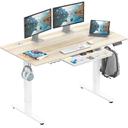
SHW 55 x 28 Inches Electric Height Adjustable Standing Desk with Drawer and Memory Preset, Maple
SHW's electric standing desk, backed by over 21,000 reviews and a 4.5-star average, offers memory presets and a spacious work surface — best for most WFH upgrades.
Buy on Amazon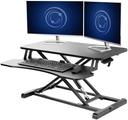
VIVO 32 inch Desk Converter
With a near-perfect 4.6-star rating from 12,800 users, the VIVO converter is the budget-friendly way to add sit-stand flexibility to any desk.
Buy on AmazonOffice Chairs
An office chair isn't just seating; it's the foundation of your posture for 40+ hours a week. A well-designed ergonomic chair with adjustable lumbar support and armrests can cut chronic back pain and improve focus. Verified buyers rave about models that combine lumbar support and breathable mesh — prioritize adjustability over flashy aesthetics. The BestOffice Ergonomic Chair, despite its low price, incorporates a high-density foam seat and adjustable lumbar support that thousands of reviewers credit for significant back pain reduction. Its breathable mesh back and flip-up armrests adapt to different body types and desk heights, proving that a supportive chair doesn't have to be expensive. Over 63,000 ratings averaging 4.3 stars confirm its reliability as a day-one comfort upgrade.
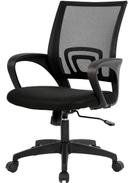
BestOffice Ergonomic Office Chair
Earning a solid 4.3 stars from a massive 63,640 reviews, this chair proves comfortable, supportive seating doesn't need to cost a month's rent.
Buy on AmazonMonitors
A second monitor or a larger screen isn't a luxury — it’s a productivity multiplier. Working on a laptop alone promotes hunching; an external display at eye level reduces neck strain by up to 70% in some studies. Look for an IPS panel with at least 250 nits brightness and Eyesafe certification to reduce eye fatigue during long workdays. The HP 27-inch IPS monitor features Eyesafe certification to filter blue light without distorting color, making long spreadsheet sessions less fatiguing. Its vibrant 1080p resolution and wide viewing angles mean you can share your screen during video calls without compromising clarity. A total of 25,410 reviews averaging 4.7 stars underscore its reputation for eye comfort and picture quality.
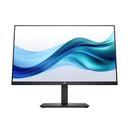
HP Series 3 27 inch FHD Monitor, Full HD Display (1920 x 1080), IPS Panel, 1300:1 Contrast Ratio, 250 Nits, Eye Ease with Eyesafe Certification, Black, 327se (2025)
Impressing 25,410 reviewers with a 4.7-star average, this HP 27-inch IPS panel delivers vivid color and eye-safety features for all-day coding and spreadsheet work.
Buy on Amazon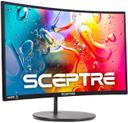
Sceptre Curved 24-inch Gaming Monitor 1080p R1500 98% sRGB HDMI x2 VGA Build-in Speakers, VESA Wall Mount Machine Black (C248W-1920RN Series)
A highly-rated (4.6 stars, 22,658 reviews) curved 24-inch monitor with built-in speakers, ideal for budget-conscious multi-taskers.
Buy on AmazonMice
A wireless mouse may seem trivial, but the right one can prevent wrist and shoulder pain from repetitive reaching. Ergonomic contours and thumb rests keep your hand in a neutral position, cutting strain significantly. Prioritize responsive optical tracking over flashy RGB lighting — your wrist will thank you after 8 hours. The TECKNET wireless mouse’s ergonomic shape supports your palm and thumb, reducing strain during long scrolling or design work. With a reliable 2.4G connection and a battery life that lasts months, it’s a set-and-forget tool that keeps your desk cord-free. 77,909 reviews and a 4.5-star rating highlight its comfort and durability at a price that’s hard to beat.
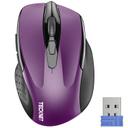
TECKNET Wireless Mouse, 2.4G Ergonomic Optical Mouse
TECKNET's wireless mouse, dominating its category with 77,909 reviews and a 4.5-star consensus, combines ergonomic design with reliable 2.4G connection — a top pick for value.
Buy on AmazonKeyboards
Keyboards are where form meets function. A mechanical keyboard with tactile feedback reduces typing force and may lower the risk of repetitive strain injuries. The compact tenkeyless layout also frees up desk space for your mouse and notes — a small change with big comfort gains. The Redragon K552’s red switches deliver a satisfying tactile bump without loud clicks, making them ideal for shared workspaces. Its compact tenkeyless design frees up precious desk real estate for your mouse, reducing arm reach and shoulder tension. A 4.5-star average across 51,559 reviews confirms that mechanical keyboards can reduce typing fatigue and improve speed without a steep learning curve.
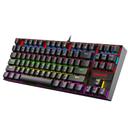
Redragon K552 Mechanical Gaming Keyboard, 87-Key Compact, LED Gaming Keyboard with Red Switches, Anti-Ghosting, Metal Frame for PC Gaming & Typing, Beginner-Friendly (Black)
The Redragon K552, with over 51,500 reviews and a 4.5-star average, packs mechanical precision and a compact frame, making it the go-to for typing comfort on day one.
Buy on AmazonDesk Organizers
Clutter is the silent productivity killer. A tidy desk reduces mental load and prevents frantic cable tangles that disrupt focus. Modular drawer organizers with adjustable compartments let you customize your setup, turning chaos into calm with minimal investment. The Vtopmart 25-piece set includes four different tray sizes that fit standard desk drawers, instantly sorting pens, sticky notes, paper clips, and charging cables. With a 4.7-star average from nearly 42,000 buyers, it’s clear that a clutter-free desk helps maintain a clear mind, reducing stress and boosting productivity. The modular design lets you reconfigure as your storage needs evolve.
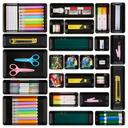
Vtopmart 25 PCS Office Desk Drawer Organizers Set, 4-Size Versatile Plastic Drawer Organizer Trays, Storage Bins for Desk Accessories Office Organizers and Storage, Bathroom, Makeup, Vanity, Black
Vtopmart's 25-piece set, praised by 41,890 reviewers with a 4.7-star average, tackles every drawer size with customizable trays, banishing clutter instantly.
Buy on Amazon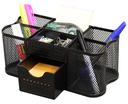
Deco Brothers Desk Organizers Pen Holder Office Caddy Storage, Black
Deco Brothers' caddy earns a superb 4.8-star rating from 14,419 users, proving that simplicity and durability can organize your desktop without breaking the bank.
Buy on AmazonYour Complete Shopping List at a Glance
Budget breakdown
| Category | Budget | Mid-Range | Comfort |
|---|---|---|---|
| Standing Desks | $140 | $190 | $304 |
| Office Chairs | $28 | $40 | $64 |
| Monitors | $103 | $178 | $286 |
| Mice | $7 | $10 | $16 |
| Keyboards | $26 | $37 | $59 |
| Desk Organizers | $16 | $20 | $32 |
| Total | $320 | $475 | $761 |
Tips & common mistakes
💡 Start with the chair and desk before accessories.
These are your foundation. A bad chair short-circuits any monitor arm or fancy keyboard; invest in these first to anchor your ergonomic setup. Look for a desk with smooth height adjustment and a chair with adjustable seat depth and lumbar height—these small tweaks make a huge difference over an eight-hour shift.
💡 Adjust your monitor to eye level.
The top of the screen should be at or slightly below eye height to prevent neck craning, reducing strain on your cervical spine throughout the day. If you use a laptop as a second screen, prop it up on a stand so it matches the height of your external monitor to avoid constant tilting.
💡 Use a keyboard tray or monitor arm to reclaim desk depth.
An under-desk keyboard tray frees up prime central space, and a monitor arm eliminates the bulky stand, creating a cleaner, more comfortable workspace. These add-ons also make it easier to switch between sitting and standing without rearranging everything twice a day.
💡 Don’t overlook cable management early.
Routing cables neatly behind the desk prevents tripping hazards and visual distraction, making your space feel more open and less stressful. Use adhesive clips or a cable spine to bundle cords, and label them for quick identification during troubleshooting.
⚠️ Buying a chair based solely on looks or low price.
Cheap chairs lack adequate lumbar support and durable padding. They flatten after months, forcing you into poor posture that accelerates back pain and may lead to more serious spinal issues. A chair that feels okay in the first week might become agony by month three if the foam compresses.
⚠️ Skipping a keyboard tray and using a laptop on the desk.
Typing directly on a laptop keyboard forces your wrists into an awkward angle and pushes the screen too low. This combined strain can lead to carpal tunnel and chronic neck pain. Budget external keyboards like the Redragon K552 can prevent these issues for a fraction of a doctor’s visit.
Frequently asked questions
What's the first thing I should buy for my WFH ergonomic upgrade?
Start with your office chair and standing desk. These two items set the foundation for good posture and reduced back pain. A quality chair with lumbar support and a desk that alternates sitting and standing are proven to cut discomfort significantly. Many users find that investing in these two items eliminates the need for separate back braces or cushions. Accessories like a monitor arm or keyboard can come later once you've established the proper baseline.
Do I need a standing desk, or is a converter enough?
A desk converter is an excellent budget-friendly alternative to a full standing desk. It sits on your existing surface and raises your monitor and keyboard to a comfortable standing height. For many, this saves hundreds and provides the same sit-stand flexibility. Full desks are better if you need a completely new, integrated setup with more space or want electric memory presets that converters lack. If your current desk is sturdy, a converter is a smart first step.
How much should I budget for a complete ergonomic home office?
A complete setup can range from $320 for a basic configuration (converter, budget chair, low-cost monitor, basic keyboard/mouse) to over $2,000 for premium powered desks, high-end ergonomic chairs, and dual monitors. We recommend prioritizing chair and desk first, which total around $230–$300 in the mid-range, then adding a monitor and accessories as your needs and budget allow over time. Spreading purchases across a few paychecks can make a full upgrade manageable.
Can cheap ergonomic chairs actually relieve back pain?
Yes, many budget-friendly chairs can still provide relief. The key is high-density foam or mesh support and adjustable lumbar settings. While premium chairs offer longer warranties and more customization, thousands of verified buyers report that even sub-$50 models can dramatically improve comfort when properly adjusted to your body. Pairing a budget chair with a lumbar cushion if needed can further enhance support without a major investment.
I'm in a small apartment. What's the minimum I need?
Focus on a compact converter for sit-stand, a slim wireless keyboard-mouse combo, and an adjustable monitor arm to maximize desk real estate. Skip extra accessories; a well-organized tiny desk with good posture can outperform a cluttered large one. The TECKNET mouse and Redragon keyboard are low-profile space savers that keep your surface free for notebooks or a coffee mug. Consider a vertical laptop stand to reclaim even more space.
How often should I replace my office chair or other gear?
A quality office chair typically lasts 5-10 years depending on use. Watch for flattening foam or broken mechanisms — replace sooner if support is gone. Keyboards and mice can last 2-3 years with daily use, but switches may wear out, leading to missed keystrokes. Monitors often outlast everything else; replace only if you notice flickering or color degradation. Always listen to your body: new pain is a signal something needs updating, even if the gear still looks fine.