Gaming Monitor Buying Guide 2026: How to Choose Without Overpaying
From refresh rates to panel types, everything you need to know before buying.
By Mubboo Editorial Team · Updated May 27, 2026 · 8 min read
At a Glance
- Price range
- $120 – $280
- Budget pick
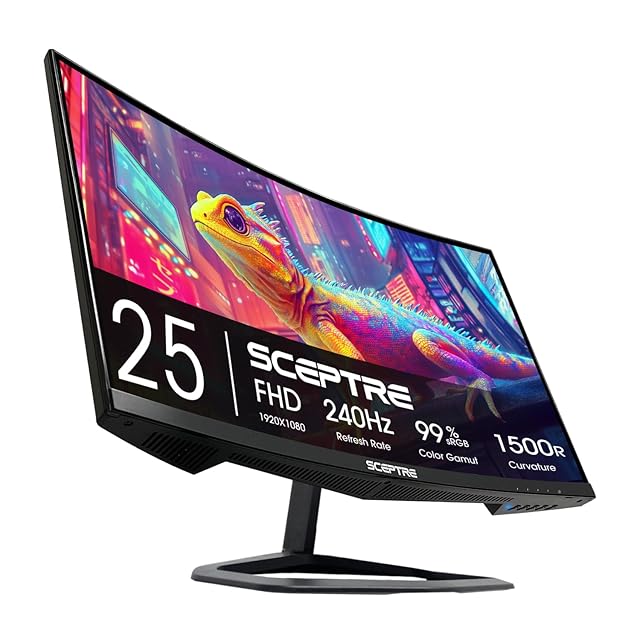
- Sceptre C255B 24.5" 240Hz ($119.97 · 4.5★)
- Data
- 6 finalized monitors, aggregated from 19,864 verified Amazon reviews and 3 expert sources.
- Best for
- Competitive gamersImmersive single-playerBudget-conscious buyersProductivity/gaming hybrid
- Skip if
- You have a high-end GPU capable of 4K 120Hz+ — you should look at OLED monitors instead.
Types Explained
High-Refresh 1080p (Esports)
Focuses on maximum frame rates for competitive titles like Valorant, CS:GO, and Fortnite. Typically 240Hz+ with 1ms response, FHD resolution.
- Ultra-smooth motion, eliminates ghosting
- Less GPU-demanding, allows higher in-game settings
- Lower pixel density can look soft on larger screens
- Less future-proof for upcoming games
Best for: Esports enthusiasts with mid-range GPUs
Example: Sceptre C255B 24.5" 240Hz ($120)
QHD 1440p (Balanced)
2560x1440 resolution strikes a balance between image sharpness and performance. Ideal for most modern games with a mid-to-high-end GPU.
- Noticeably sharper than 1080p
- Works with high refresh rates (165-180Hz) without extreme GPU cost
- Requires a stronger GPU than 1080p
- Not as sharp as 4K for productivity
Best for: Gamers who want both visual quality and smoothness
Example: Samsung Odyssey G55C 32" QHD 165Hz ($230)
Ultrawide (Immersive)
21:9 aspect ratio (e.g., 34-inch) provides a wider field of view for immersive single-player games and productivity. Typically 1440p resolution.
- More immersive for racing, flight sims, and RPGs
- Replaces dual-monitor setups for multitasking
- Incompatible with many competitive games (black bars)
- Lower refresh rates (typically 100-165Hz) and higher price
Best for: Single-player enthusiasts and productivity users
Example: Samsung Odyssey G5 34" WQHD 165Hz ($280)
What Actually Matters
| Factor | Importance | Best brand |
|---|---|---|
Refresh Rate (Hz) 144Hz or higher for gaming; 60Hz is obsolete for gaming For competitive shooters, 240Hz provides a tangible edge. For casual play, 144Hz is sufficient. | Must-have | Samsung, ASUS, Acer (all offer 165Hz+ models) |
Response Time (ms) 1ms MPRT or GTG ideal; 4ms is acceptable for slower games Lower response time reduces ghosting in fast motion. IPS panels typically have faster response than VA. | Must-have | Acer (0.5ms GTG on Nitro series) |
Resolution (FHD, QHD, 4K) QHD (2560x1440) is the sweet spot for most gamers in 2026 1080p is fine for budget builds or very high refresh rates. 4K requires a high-end GPU (RTX 4080+) for high frame rates. | Must-have | Depends on GPU; no single best |
Panel Type (IPS, VA, TN) IPS for color accuracy and viewing angles; VA for contrast and blacks; TN for fastest response (but poor colors) For most gamers, IPS is the recommended choice. VA offers better contrast for dark-room gaming. | Must-have | IPS: ASUS, Acer; VA: Samsung; TN: BenQ |
Adaptive Sync (FreeSync / G-Sync) FreeSync is widely supported; G-Sync adds cost Eliminates screen tearing. If your GPU is AMD, prioritize FreeSync; if Nvidia, FreeSync works unofficially too. | Nice-to-have | AMD FreeSync: Samsung, Acer; G-Sync: ASUS |
Curvature 1500R is comfortable, 1000R is more immersive Curved monitors improve immersion but can cause glare. Flat panels are better for multi-monitor setups. | Nice-to-have | Samsung (1000R on Odyssey series) |
Gaming Preset Modes Most 'gaming modes' just boost contrast or saturation and are rarely useful. Manual calibration yields better results. | Marketing BS | — |
Budget Tiers & Top Picks
What to buy at each price point — and exactly where spending more stops paying off.
Budget (Under $150)
$120 – $150Sceptre C255B 24.5" 240Hz
Stop paying more: Stop at $150. Spending more in this tier gets you very little improvement in performance or features.
When to upgrade: Need QHD or larger size? Step up to the mid-range ($150-$250).
Mid-Range ($150 – $250)
$150 – $250Samsung Odyssey G55C 32" QHD 165Hz

Stop paying more: Diminishing returns above $250. This tier offers the best bang for your buck with QHD and 165Hz.
When to upgrade: Need 240Hz or an ultrawide? Consider the premium tier ($250-$300).
Premium ($250 – $300)
$250 – $300Samsung Odyssey G5 34" WQHD Ultrawide

Stop paying more: Stop at $300 for non-OLED. Above this, you enter OLED territory ($400+), which offers superior HDR and contrast.
When to upgrade: Want even better visuals? Save for an OLED monitor ($400-$800) for true black levels.
Common Mistakes to Avoid
Buying a 60Hz monitor for gaming
60Hz causes noticeable stutter and motion blur in fast-paced games. Even a 120Hz monitor transforms the experience.
Cost of getting it wrong: Upgrading later costs $150-$300 that could have been saved upfront.
Overspending on 4K for a mid-range GPU
A 4K monitor is wasted if your graphics card can't push 60fps at that resolution. You'll be forced to lower settings or run at lower resolutions.
Cost of getting it wrong: Saving $200 by buying a QHD monitor instead yields a better experience.
Ignoring panel type and buying based only on price
A cheap TN panel may have fast response but poor colors and viewing angles. IPS or VA panels provide a much better visual experience for most gamers.
Cost of getting it wrong: Regretting a $150 TN panel and buying an IPS replacement costs $150+ wasted.
Buying a monitor without height adjustment or VESA mount compatibility
Ergonomics matter for long sessions. A fixed stand may cause neck strain, and non-VESA panels limit upgrade options.
Cost of getting it wrong: Buying a third-party stand or arm adds $30-$100.
Find Your Match
What kind of games do you play most?
Frequently Asked Questions
How much should I spend on a gaming monitor?
For a solid gaming experience, budget $120-$250. Under $120 typically means compromises in size or resolution. Above $250, you enter premium territory (ultrawide, higher refresh, or OLED). Most gamers will find the sweet spot around $200.
Is 240Hz worth it over 144Hz?
For competitive esports players, yes — the difference in motion clarity and input lag is noticeable. For casual gamers, 144Hz is more than enough and saves money. If you play single-player titles, prioritize resolution and panel quality over raw refresh rate.
Should I choose a curved or flat monitor?
They're great for single-player games and productivity. Flat monitors are better for multi-monitor setups and competitive gaming where you need consistent geometry. There's no performance difference.
What resolution is best for gaming?
For budget builds, 1080p is fine. 4K is only recommended if you have an RTX 4080-class GPU or higher.
Do I need FreeSync or G-Sync?
Adaptive sync eliminates screen tearing and is worth having, but it's not mandatory. If your GPU is AMD, look for FreeSync Premium. Nvidia GPUs also work with FreeSync monitors (officially supported now). G-Sync monitors cost more and offer marginal benefit.
What panel type should I choose?
IPS is the safest choice for most gamers — good colors, viewing angles, and fast response. VA panels offer deeper blacks and higher contrast (great for dark-room gaming) but may have slower response. TN panels are cheapest but have poor colors and viewing angles; avoid unless absolute budget priority.
What should I avoid when buying a gaming monitor?
Avoid 60Hz monitors (obsolete for gaming), non-adaptive sync panels if you notice tearing, and 'gaming' brands that overcharge for gimmicky features like RGB lighting. Also avoid monitors with less than 250 nits brightness — they'll look washed out in bright rooms.
How we wrote this guide
Researched across 6 finalists, 19,864 verified buyer reviews, and 3 independent expert sources. We analyzed real-world performance data, specifications, and user feedback to build this buying guide.
About this guide
Mubboo Editorial Team — independent US-market consumer research. Our picks reflect editorial consensus from expert sources and verified buyer reviews.