Prices verified Aug 4 · Always confirm at the retailer before buying.
Quick answer
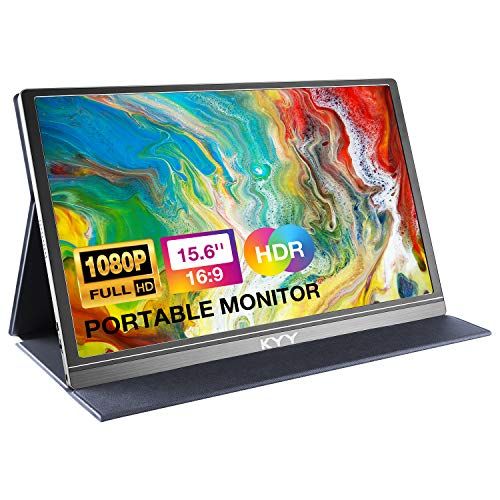
For US shoppers comparing basic 15.6-inch portable monitors, MNN is listed at $49.99 and KYY at $69.99, making MNN $20.00 lower in the current registry snapshot. Both are in the 1080p class. KYY's K3 manufacturer page lists 60Hz and explains USB-C, Mini-HDMI, and separate-power behavior. MNN's brand page describes 15.6-inch FHD 1080p USB-C and HDMI connectivity and warns that the host USB-C port must support video output. KYY has the slightly higher captured rating and larger review pool. No independent display, cable, gaming, or device-compatibility test was performed, so confirm the exact variation, host ports, cable, adapter, and power requirements before buying.
MNN is $20.00 cheaper; KYY has the slightly stronger captured marketplace signal. Both are 15.6-inch 1080p-class options, but USB-C video and power requirements must be checked against the host device.
Mubboo Verdict
Best for most people
KYY Portable Monitor 15.6 inch 1080P
Scoped to buyers who want a conventional 15.6-inch 1080p portable monitor and prefer the slightly stronger captured marketplace signal.
Pick the MNN Portable Monitor 15.6 inch FHD 1080P 60Hz instead if
- You want the lower current snapshot price.
- Your host device supports the required USB-C or HDMI setup.
- You accept that no independent panel test was performed here.
KYY Portable Monitor 15.6 inch 1080P vs MNN Portable Monitor 15.6 inch FHD 1080P 60Hz, side by side
KYY Portable Monitor 15.6 inch 1080P

Pros:
- 15.6-inch 1080p class
- Slightly higher captured rating and larger review pool
- Official K3 page explains USB-C, Mini-HDMI, and power behavior
Cons (honest weight):
- $20.00 higher current snapshot price
- Exact variation should be matched to the official K3 page
- No independent display test here
MNN Portable Monitor 15.6 inch FHD 1080P 60Hz

Pros:
- $20.00 lower current snapshot price
- 15.6-inch FHD 1080p class
- Brand page documents USB-C video and power caveats
Cons (honest weight):
- Lower captured rating than KYY
- No independent display or gaming test here
- USB-C video support varies by host device
Where each one wins
7 dimensions scored head-to-head. KYY Portable takes 1; MNN Portable takes 1.
| Dimension | KYY Portable Monitor 15.6 inch 1080P | MNN Portable Monitor 15.6 inch FHD 1080P 60Hz | Winner |
|---|---|---|---|
| Current US priceMNN is $20.00 lower in the current registry snapshot. | $69.99 | $49.99 | MNN Portable |
| Screen size and resolutionBoth are compared as conventional 15.6-inch Full HD portable monitors. | 15.6-inch, 1920 x 1080 | 15.6-inch, 1920 x 1080 | Tie |
| Refresh-rate evidenceThe evidence is variation-sensitive; this is not a gaming performance test. | KYY K3 official page lists 60Hz; verify exact variation | 60Hz in captured listing title | Tie |
| Connection formatsPort names alone do not prove that a laptop USB-C port carries video. | USB-C and Mini-HDMI on the KYY K3 page | USB-C and HDMI described on the MNN brand page | Tie |
| Power and USB-C caveatCheck DisplayPort Alt Mode, cable requirements, and the exact device before buying. | USB-C video cable can carry video; HDMI needs separate power | USB-C video and power depend on device support; external power may be needed | Tie |
| Captured marketplace signalKYY has the slightly higher captured rating and larger review pool; this is not a panel test. | 4.4 / 5 from 12,904 reviews | 4.3 / 5 from 11,561 reviews | KYY Portable |
| Independent display test hereNo brightness, color, response-time, battery, speaker, or gaming test was performed. | Not performed | Not performed | Tie |
| Overall | 1 win | 1 win | Tie |
Start with the practical difference: price versus evidence
MNN is listed at $49.99 and KYY at $69.99, so MNN is $20.00 lower in the current US registry snapshot. Both are treated here as 15.6-inch 1080p portable-monitor options. KYY has the slightly higher captured rating and larger review pool, while MNN has the lower entry price. Neither signal is a substitute for a display test.
KYY's K3 product page lists a 15.6-inch 1920x1080 display at 60Hz and explains that USB-C can carry power and video while Mini-HDMI carries video and needs separate power. MNN's brand page describes the M156F01 as a 15.6-inch FHD 1080p monitor with USB-C and HDMI, and warns that the host USB-C port must support video output. These are manufacturer or brand descriptions, not independent measurements.
USB-C is a compatibility question, not just a connector name
A USB-C port on a laptop or phone may support charging and data without supporting DisplayPort Alt Mode video. If the host cannot output video over USB-C, use the supported HDMI path or a compatible adapter. HDMI connections commonly need a separate USB power connection. Check the exact host device, cable, adapter, and monitor variation before buying.
What the marketplace numbers can and cannot tell you
KYY is recorded at 4.4 stars from 12,904 reviews; MNN is recorded at 4.3 stars from 11,561. Those are current registry snapshots, not controlled measurements of brightness, color accuracy, dead pixels, response time, speakers, HDR, power draw, or gaming performance.
Choose by setup, not by the word “portable”
For a simple second screen, confirm that your laptop can extend or mirror a display and that the monitor receives enough power. For a phone or game console, check adapter requirements and whether the device supports the needed video output. A travel-friendly size does not guarantee one-cable operation.
Alternatives
cocopar is a same-class 15.6-inch 1080p alternative with a higher captured price. KEFEYA is a laptop screen-extender format, so it is a different physical and compatibility choice rather than a direct substitute. Verify the exact model, ports, and dimensions on the live listing.
What this comparison does not test
No brightness, color, response-time, battery, speaker, gaming, dead-pixel, cable, or device-compatibility test was performed. The recommendations are limited to current registry facts and linked brand/manufacturer information.
Which should you buy?
| Your situation | Pick | Why |
|---|---|---|
| Current price | MNN Portable Monitor 15.6 inch FHD 1080P 60Hz | Lower by $20.00 in the current snapshot. |
| Marketplace signal | KYY Portable Monitor 15.6 inch 1080P | Higher captured rating and larger review pool. |
| Setup documentation | KYY Portable Monitor 15.6 inch 1080P | KYY K3 page gives a clearer cable and power breakdown. |
| Basic portable-monitor fit | MNN Portable Monitor 15.6 inch FHD 1080P 60Hz | Both are 15.6-inch 1080p-class options. |
| Verified display performance | MNN Portable Monitor 15.6 inch FHD 1080P 60Hz | No independent display test was performed. |
Lower by $20.00 in the current snapshot.
Higher captured rating and larger review pool.
KYY K3 page gives a clearer cable and power breakdown.
Both are 15.6-inch 1080p-class options.
No independent display test was performed.
What if neither is right?
cocopar 15.6 inch 1080P Portable Monitor
$119.99
A same-class 15.6-inch 1080p alternative with a higher current snapshot price; verify the exact model and ports.
KEFEYA Laptop Screen Extender
$94.99
A different dual-screen form factor, not a direct single portable-monitor substitute; confirm laptop size and compatibility.
Frequently Asked Questions
Which is better, KYY or MNN portable monitor?
KYY is the scoped pick for the slightly stronger captured marketplace signal and clearer K3 setup documentation. MNN is $20.00 cheaper in the current snapshot. Neither was independently display-tested here.
Which portable monitor is cheaper?
MNN is listed at $49.99 versus $69.99 for KYY, a $20.00 difference in the current registry snapshot. Verify live pricing before buying.
Will any USB-C port work with these monitors?
No. The host USB-C port must support video output, often through DisplayPort Alt Mode. Check the exact laptop or phone specification, cable, adapter, and power setup.
Can I connect a portable monitor with HDMI only?
Usually the HDMI path carries video while the monitor receives power separately, but the exact cable and power arrangement varies by model. Check the current instructions for the exact variation.
Are these monitors independently tested for brightness or gaming?
No. This comparison does not include controlled brightness, color, response-time, dead-pixel, speaker, battery, cable, or gaming tests.
Are KYY and MNN direct substitutes?
They are compared in the same broad 15.6-inch 1080p portable-monitor class, but the exact ports, power needs, accessories, and host-device compatibility still need checking.
Primary sources: Current price, rating, review count, stock, and product images use the exact US listing records for Amazon US product listing (B088D8JG3L) and Amazon US product listing (B0B9NNWXVP). Setup and specification context is linked from KYY's K3 product page and MNN's brand page. Manufacturer and brand descriptions are not independent tests.
Who wrote this and where's the data from?
Author: Mubboo Editorial Team. Independent US-market consumer research using current registry records and linked brand/manufacturer information. Last verified: 2026-08-04.